> ## Documentation Index
> Fetch the complete documentation index at: https://docs.safedep.io/llms.txt
> Use this file to discover all available pages before exploring further.
# Package Guard
> Monitor and control package installations across your endpoints using SafeDep Cloud
Package Guard shows package installs and usage across your endpoints. It runs on [PMG](/package-security/pmg/quickstart), SafeDep's open-source Package Manager Guard CLI that intercepts package manager commands and syncs the activity to SafeDep Cloud.
## Prerequisites
* Install PMG using the [quickstart guide](/package-security/pmg/quickstart)
* Have a SafeDep Cloud tenant ID and API key (see [Cloud quickstart](/governance/cloud/quickstart))
## Enable cloud sync
```bash theme={null}
pmg setup install
```
```text Example output theme={null}
█▀█ █▀▄▀█ █▀▀ From SafeDep (github.com/safedep/pmg)
█▀▀ █░▀░█ █▄█ version: v0.9.0 commit: c3a351
✓ PMG aliases installed successfully
Installed to: /home/user/.pmg.rc
Config at: /home/user/.config/safedep/pmg
Restart your terminal or source your shell to use the new aliases
```
Open the config file from the path shown above (run `pmg setup info` to verify) and enable cloud sync:
```yaml theme={null}
cloud:
enabled: true
```
```bash theme={null}
pmg cloud login
```
Enter your **tenant ID** and **API key** when prompted.
With cloud sync enabled, PMG syncs automatically as you use it (see [Automatic sync](#automatic-sync) below). To push local activity immediately, run:
```bash theme={null}
pmg cloud sync
```
## Automatic sync
Once cloud sync is enabled, PMG syncs events on its own, so you don't need to run `pmg cloud sync` by hand. At the end of each PMG invocation, PMG drains its local event log to SafeDep Cloud in a short-lived detached process, so your command returns immediately.
This applies whether you invoke PMG directly (`pmg npm install ...`) or indirectly through the shell aliases and path shims installed by `pmg setup install`, which route plain `npm`, `pip`, and other package manager commands through PMG.
To avoid syncing on every command, auto-sync is gated by a per-host cooldown. The cooldown timestamp updates on every attempt, success or failure, so a temporarily unreachable cloud endpoint won't make every command retry.
Auto-sync is on by default. Tune or disable it under `cloud.auto_sync` in the PMG config:
```yaml theme={null}
cloud:
enabled: true
auto_sync:
enabled: true # set to false to disable automatic sync
min_interval: 15m # example: minimum gap between sync attempts
timeout: 5m # example: hard timeout for a single sync attempt
```
PMG ships with sensible defaults for `min_interval` and `timeout`. See the [PMG config template](https://github.com/safedep/pmg/blob/main/config/config.template.yml) for the current values.
Disable auto-sync in ephemeral environments such as CI runners and throwaway VMs. The detached process may be torn down before it finishes draining. Run an explicit `pmg cloud sync` at job-end instead.
## Manual sync
Run `pmg cloud sync` to push local events immediately instead of waiting for the next automatic sync:
* **In CI/CD pipelines:** Disable auto-sync and add `pmg cloud sync` as a post-step after PMG runs, so events are flushed before the runner is torn down.
* **Forcing an immediate push:** When you don't want to wait out the cooldown, for example right after a large dependency update.
## View package events in SafeDep Cloud
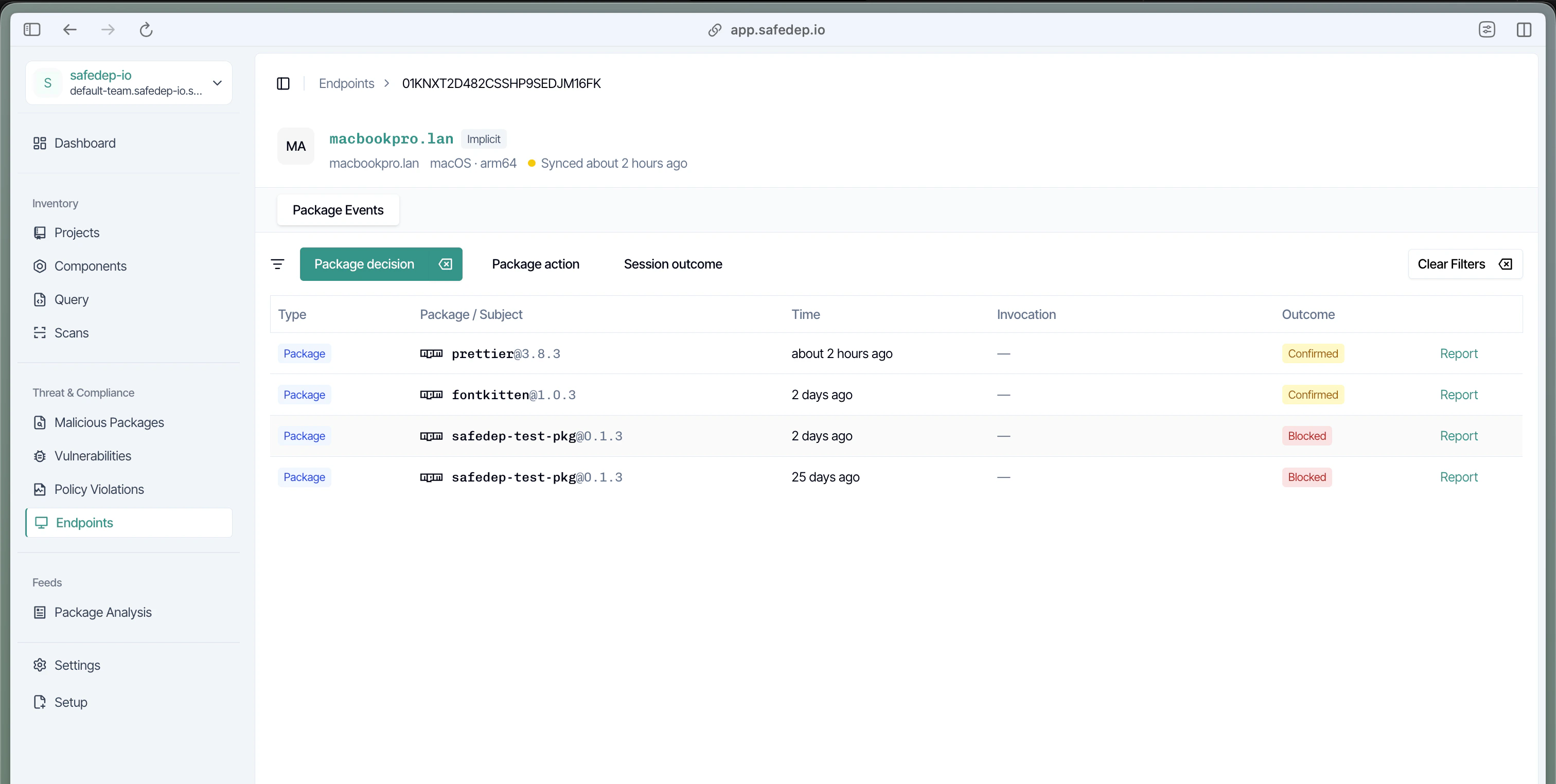
After syncing, open [app.safedep.io](https://app.safedep.io), select **Endpoint Hub** in the sidebar, and pick your endpoint to see the **Package Events** timeline.
## Next steps
Install PMG and learn the basics
 ## Next steps