> ## Documentation Index
> Fetch the complete documentation index at: https://docs.safedep.io/llms.txt
> Use this file to discover all available pages before exploring further.
# Malware Analysis
> Detect malicious packages in your dependencies using SafeDep Cloud's advanced code analysis capabilities
Malware analysis is available for free with SafeDep Cloud. See [pricing](https://safedep.io/pricing) for details.
Analyze open source packages for malicious code using [Vet](https://github.com/safedep/vet) with SafeDep Cloud's hosted analysis service. The service scans package artifacts from public package registries.
## Supported Ecosystems
JavaScript and TypeScript packages
Python packages and wheels
Go language modules
Ruby packages and gems
GitHub Action workflows
Visual Studio Code extensions
## Requirements
You must have [Vet](https://github.com/safedep/vet) version `1.9.7` or above installed.
You must be onboarded to SafeDep Cloud with a Tenant Domain and API Key. See [SafeDep Cloud Quickstart](/governance/cloud/quickstart) for onboarding instructions.
## Repository Scanning
### Basic Malware Scanning
Enable malware analysis with the `--malware` flag:
```bash theme={null}
vet scan -D /path/to/code --malware
```
`vet` waits for a timeout period for malware analysis to complete. This works well for pull requests and CI/CD pipelines where the number of changed packages is small.
### Timeout Configuration
Adjust analysis timeout for different scenarios:
```bash theme={null}
# Quick scan with shorter timeout
vet scan -D . --malware --malware-analysis-timeout 5m
# Thorough scan with longer timeout
vet scan -D . --malware --malware-analysis-timeout 15m
```
### Specific Manifest Scanning
Scan individual package manifest files:
```bash theme={null}
# npm projects
vet scan -M package-lock.json --malware
# Python projects
vet scan -M requirements.txt --malware
# Go projects
vet scan -M go.mod --malware
# Ruby projects
vet scan -M Gemfile.lock --malware
```
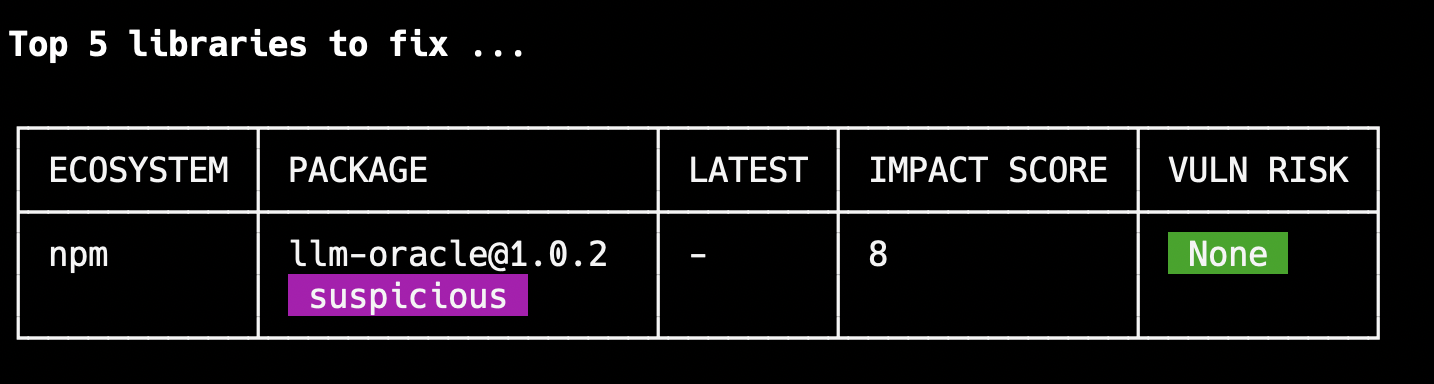
### PURL-Based Scanning
Scan specific packages using Package URLs:
```bash theme={null}
vet scan --purl pkg:npm/llm-oracle@1.0.2 --malware
```
 ## Visual Studio Code Extensions
Scan locally installed VS Code extensions:
```bash theme={null}
vet scan --vsx --malware
```
VS Code extension scanning is supported only for local developer machines, not in CI/CD environments.
## GitHub Actions Integration
### vet-action Cloud Mode
Enable malicious package protection in GitHub repositories using [vet-action](https://github.com/safedep/vet-action):
```yaml theme={null}
name: Malware Protection
on:
pull_request:
branches: [ main ]
jobs:
malware-scan:
runs-on: ubuntu-latest
steps:
- uses: actions/checkout@v4
- name: Run malware analysis
uses: safedep/vet-action@v1
with:
cloud: true
cloud-key: ${{ secrets.SAFEDEP_CLOUD_API_KEY }}
cloud-tenant: ${{ secrets.SAFEDEP_CLOUD_TENANT_DOMAIN }}
env:
GITHUB_TOKEN: ${{ secrets.GITHUB_TOKEN }}
```
### Pull Request Integration
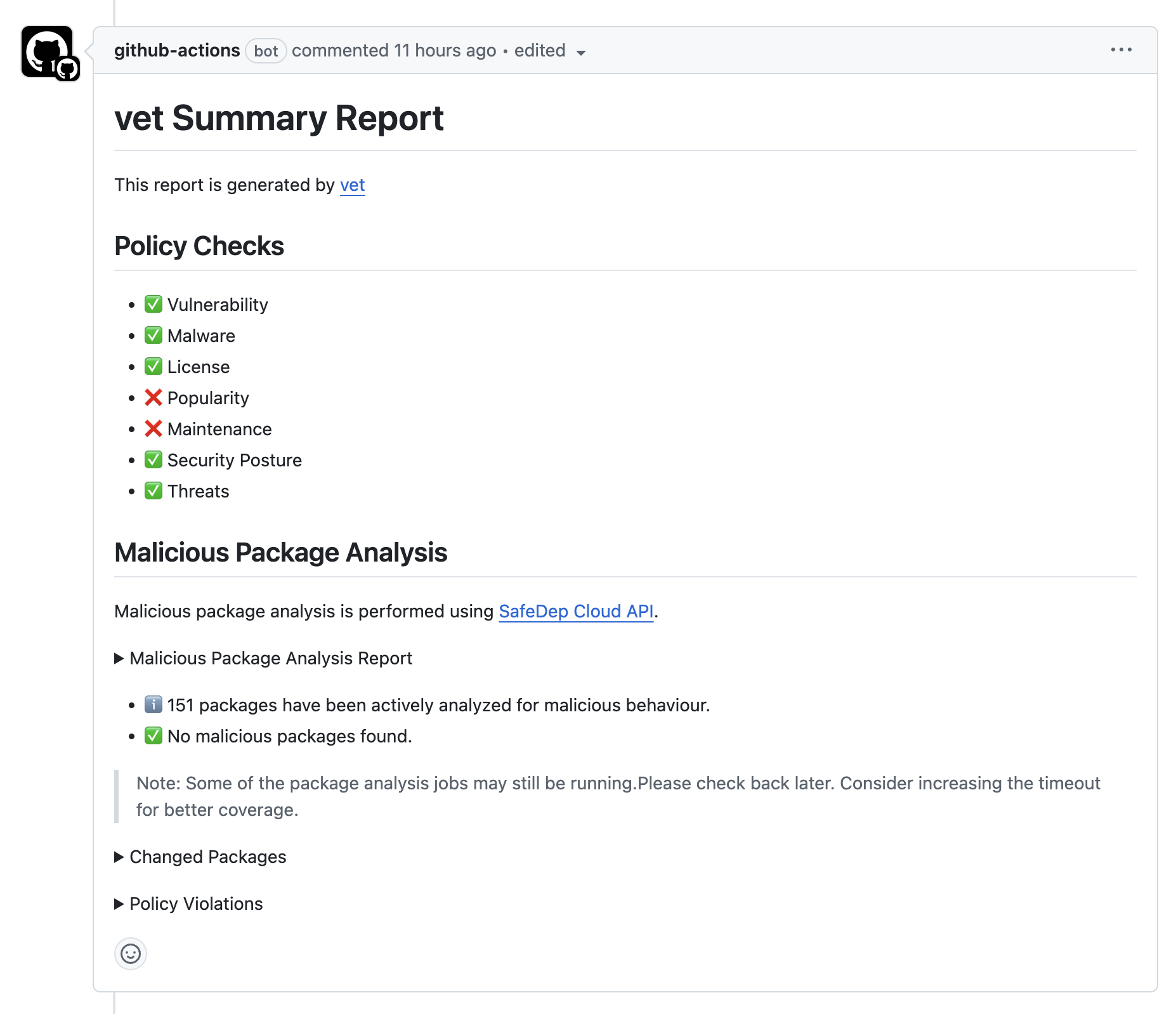
When enabled, Vet scans changed packages for malware and provides results directly in pull requests:
## Visual Studio Code Extensions
Scan locally installed VS Code extensions:
```bash theme={null}
vet scan --vsx --malware
```
VS Code extension scanning is supported only for local developer machines, not in CI/CD environments.
## GitHub Actions Integration
### vet-action Cloud Mode
Enable malicious package protection in GitHub repositories using [vet-action](https://github.com/safedep/vet-action):
```yaml theme={null}
name: Malware Protection
on:
pull_request:
branches: [ main ]
jobs:
malware-scan:
runs-on: ubuntu-latest
steps:
- uses: actions/checkout@v4
- name: Run malware analysis
uses: safedep/vet-action@v1
with:
cloud: true
cloud-key: ${{ secrets.SAFEDEP_CLOUD_API_KEY }}
cloud-tenant: ${{ secrets.SAFEDEP_CLOUD_TENANT_DOMAIN }}
env:
GITHUB_TOKEN: ${{ secrets.GITHUB_TOKEN }}
```
### Pull Request Integration
When enabled, Vet scans changed packages for malware and provides results directly in pull requests:
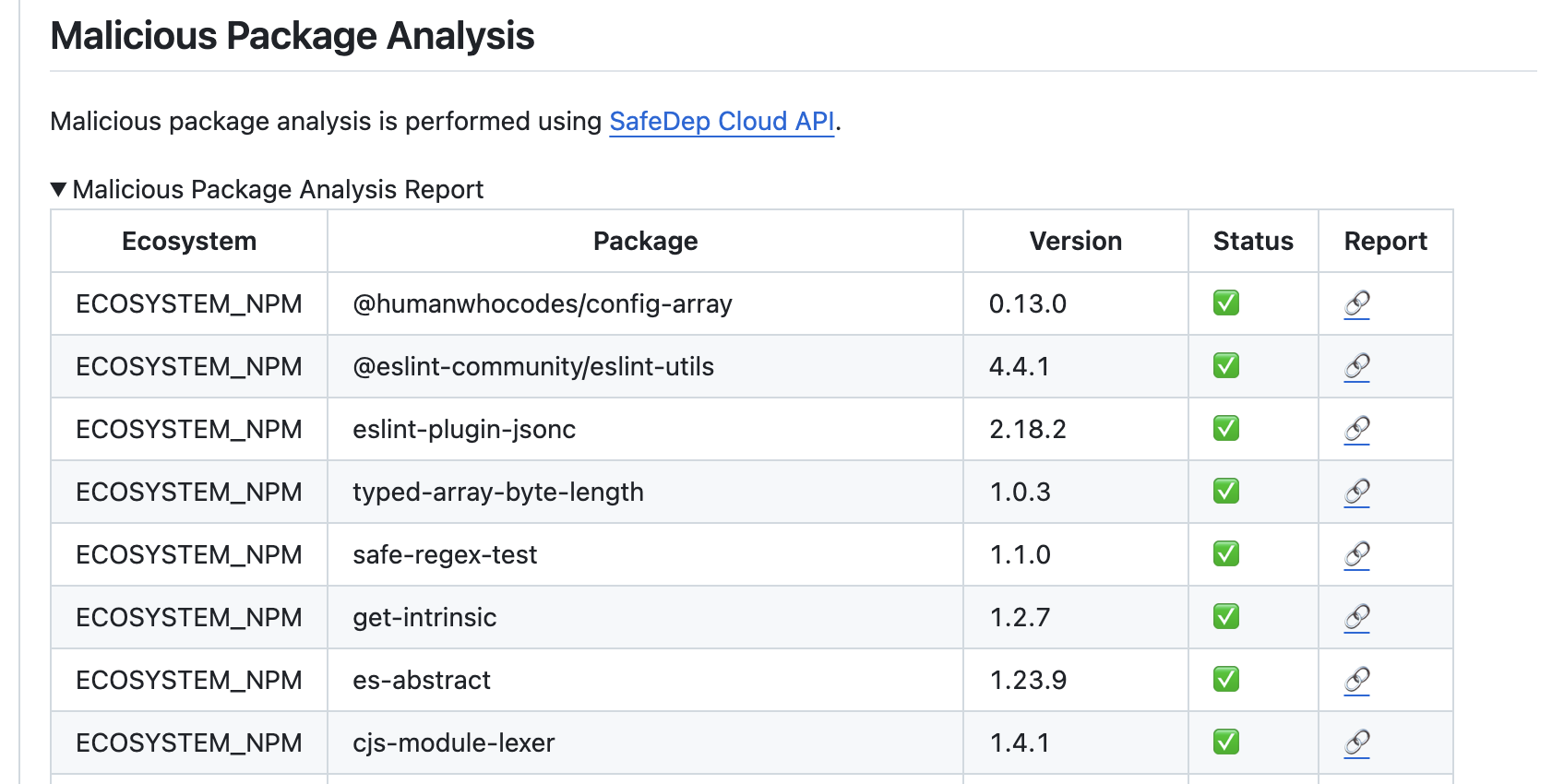
 Expand comments to view detailed package analysis results:
 ## Package Inspection
### Enable Experimental Feature
Package inspection is currently experimental. Enable it with:
```bash theme={null}
export VET_ENABLE_PACKAGE_INSPECT_COMMAND=true
```
### Inspect Single Packages
Perform detailed analysis of individual packages:
```bash theme={null}
vet inspect malware --purl pkg:npm/llm-oracle@1.0.2
```
Package analysis is performed asynchronously. Scanning usually takes a few minutes but may take longer depending on the analysis queue.
### Analysis Results
On completion, Vet shows the analysis status and classification:
## Package Inspection
### Enable Experimental Feature
Package inspection is currently experimental. Enable it with:
```bash theme={null}
export VET_ENABLE_PACKAGE_INSPECT_COMMAND=true
```
### Inspect Single Packages
Perform detailed analysis of individual packages:
```bash theme={null}
vet inspect malware --purl pkg:npm/llm-oracle@1.0.2
```
Package analysis is performed asynchronously. Scanning usually takes a few minutes but may take longer depending on the analysis queue.
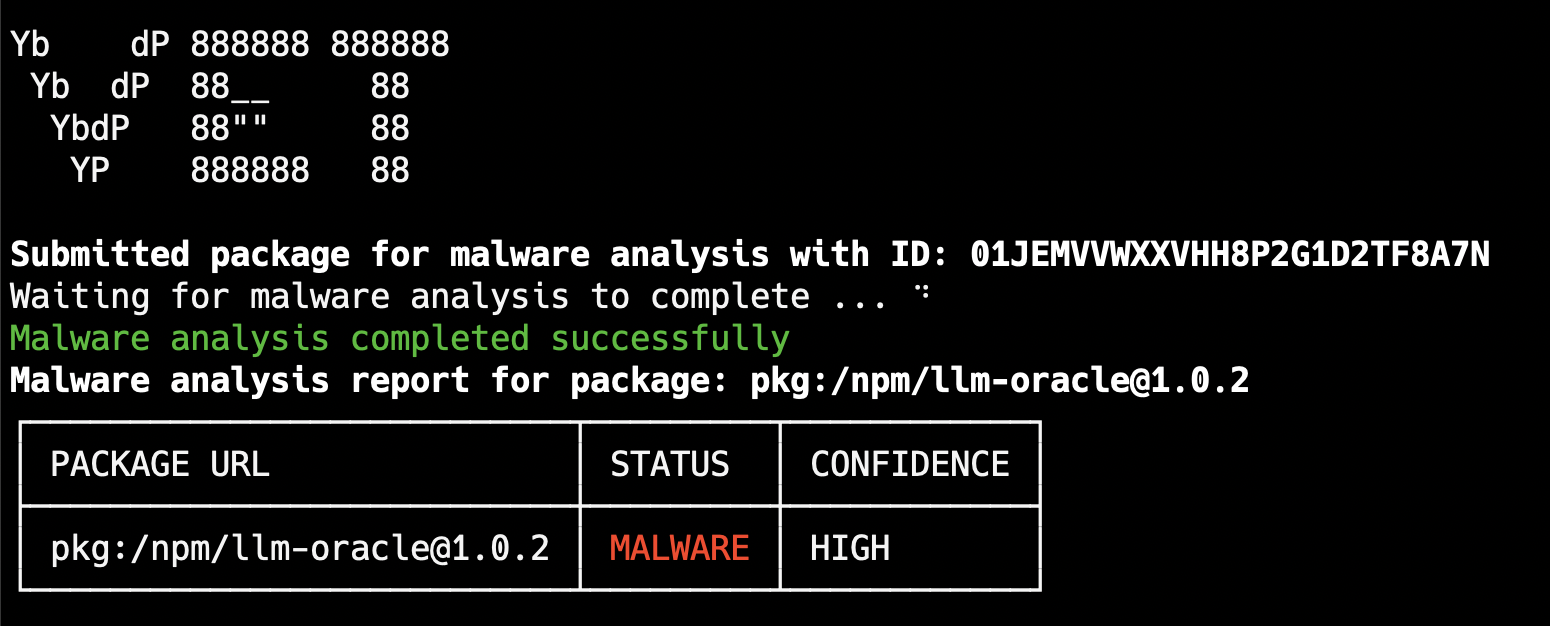
### Analysis Results
On completion, Vet shows the analysis status and classification:
 ### Export Results
Export analysis results as JSON:
```bash theme={null}
vet inspect malware \
--purl pkg:npm/llm-oracle@1.0.2 \
--report-json /tmp/analysis.json
```
## Understanding Results
### Classification Levels
* **SAFE**: No malicious behavior detected
* **SUSPICIOUS**: Potentially risky patterns identified
* **MALICIOUS**: Confirmed malicious behavior found
### Analysis Techniques
* Code pattern analysis
* Suspicious function detection
* Obfuscation identification
* Network communication patterns
* File system access patterns
* Process execution analysis
* Package metadata anomalies
* Publisher reputation analysis
* Distribution pattern analysis
## CI/CD Integration Examples
### GitLab CI
```yaml theme={null}
stages:
- security
malware-scan:
stage: security
image: ghcr.io/safedep/vet:latest
script:
- vet scan -D . --malware --report-json malware-report.json
artifacts:
reports:
security: malware-report.json
variables:
SAFEDEP_API_KEY: $SAFEDEP_API_KEY
SAFEDEP_TENANT_ID: $SAFEDEP_TENANT_ID
```
### Jenkins Pipeline
```groovy theme={null}
pipeline {
agent any
environment {
SAFEDEP_API_KEY = credentials('safedep-api-key')
SAFEDEP_TENANT_ID = credentials('safedep-tenant-id')
}
stages {
stage('Malware Scan') {
steps {
sh 'vet scan -D . --malware --report-json malware-results.json'
archiveArtifacts artifacts: 'malware-results.json'
publishTestResults testResultsPattern: 'malware-results.json'
}
}
}
}
```
## Troubleshooting
* Increase the timeout with `--malware-analysis-timeout`
* Scan smaller package sets
* Check network connectivity to SafeDep Cloud
* Verify your API key has malware analysis permissions
* Check your tenant configuration
* Ensure you are using Vet v1.9.7 or later
* Review the analysis details
* Contact SafeDep support with the package details
* Use exceptions management for temporary overrides
Complete GitHub Actions integration guide
Get started with SafeDep Cloud for malware analysis
Learn more about experimental package inspection features
Report bugs or request features for malware analysis
### Export Results
Export analysis results as JSON:
```bash theme={null}
vet inspect malware \
--purl pkg:npm/llm-oracle@1.0.2 \
--report-json /tmp/analysis.json
```
## Understanding Results
### Classification Levels
* **SAFE**: No malicious behavior detected
* **SUSPICIOUS**: Potentially risky patterns identified
* **MALICIOUS**: Confirmed malicious behavior found
### Analysis Techniques
* Code pattern analysis
* Suspicious function detection
* Obfuscation identification
* Network communication patterns
* File system access patterns
* Process execution analysis
* Package metadata anomalies
* Publisher reputation analysis
* Distribution pattern analysis
## CI/CD Integration Examples
### GitLab CI
```yaml theme={null}
stages:
- security
malware-scan:
stage: security
image: ghcr.io/safedep/vet:latest
script:
- vet scan -D . --malware --report-json malware-report.json
artifacts:
reports:
security: malware-report.json
variables:
SAFEDEP_API_KEY: $SAFEDEP_API_KEY
SAFEDEP_TENANT_ID: $SAFEDEP_TENANT_ID
```
### Jenkins Pipeline
```groovy theme={null}
pipeline {
agent any
environment {
SAFEDEP_API_KEY = credentials('safedep-api-key')
SAFEDEP_TENANT_ID = credentials('safedep-tenant-id')
}
stages {
stage('Malware Scan') {
steps {
sh 'vet scan -D . --malware --report-json malware-results.json'
archiveArtifacts artifacts: 'malware-results.json'
publishTestResults testResultsPattern: 'malware-results.json'
}
}
}
}
```
## Troubleshooting
* Increase the timeout with `--malware-analysis-timeout`
* Scan smaller package sets
* Check network connectivity to SafeDep Cloud
* Verify your API key has malware analysis permissions
* Check your tenant configuration
* Ensure you are using Vet v1.9.7 or later
* Review the analysis details
* Contact SafeDep support with the package details
* Use exceptions management for temporary overrides
Complete GitHub Actions integration guide
Get started with SafeDep Cloud for malware analysis
Learn more about experimental package inspection features
Report bugs or request features for malware analysis