> ## Documentation Index
> Fetch the complete documentation index at: https://docs.safedep.io/llms.txt
> Use this file to discover all available pages before exploring further.
# Bitbucket Pipes
> Native Bitbucket Cloud integration for SafeDep
SafeDep integrates with **Bitbucket Cloud** via [Bitbucket Pipes](https://bitbucket.org/product/features/pipelines/integrations), so you can add dependency scanning to any Bitbucket CI/CD pipeline.
## Prerequisites
Bitbucket account with access to your project
A source code repository to integrate SafeDep in `pipelines`.
## Quick Start
### 1. Enable CI on Your Project
If you don't already have a `bitbucket-pipelines.yml`, create one
```bash theme={null}
touch bitbucket-pipelines.yml
```
### 2. Add SafeDep in your pipeline
```yaml theme={null}
image: atlassian/default-image:3
pipelines:
default:
- step:
name: Run vet pipe
script:
- pipe: safedep/vet-pipe:v1.2.0
```
That's it. Default values are used for dependency scanning. For policy customization and [SafeDep Cloud](/governance/cloud/sync) integration, see the [Inputs](#inputs), [Policy](#policy-customization), and [Cloud Sync](#cloud-sync) sections.
### On Pull Request
`vet-pipe` includes a feature to scan only the packages changed within a **Pull Request**. However, this functionality relies on environment variables (such as `BITBUCKET_PR_DESTINATION_BRANCH`) that are only populated when using Bitbucket's `pull-requests` pipeline trigger.
To enable changed packages scanning for **PRs** while still supporting **Push** and **Merge** events, you must configure both the `pull-requests` and `default` (or branches) triggers. The most efficient way to implement this without code redundancy is as follows:
```yml theme={null}
image: atlassian/default-image:3
definitions:
steps:
- step: &safedep-vet-pipe
name: "Execute Vet Scan Pipe"
script:
- pipe: safedep/vet-pipe:v1.2.0
pipelines:
branches:
main:
- step: *safedep-vet-pipe
pull-requests:
'**':
- step: *safedep-vet-pipe
```
## Reports
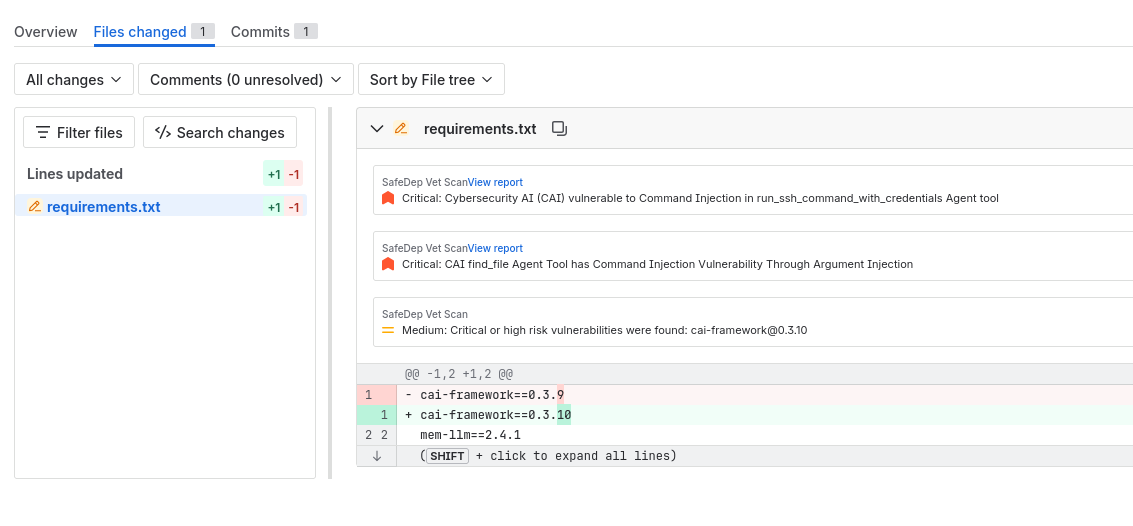
`vet-pipe` supports [Bitbucket Native Code Insights Reports](https://support.atlassian.com/bitbucket-cloud/docs/code-insights/). Each **Pull Request** or **Push** gets a report, and **findings** are attached to their respective files and visible in the Bitbucket UI.
 ## Inputs
`vet-pipe` accepts the following variables.
### Cloud Sync
Cloud Sync requires a subscription to [SafeDep Cloud](/governance/cloud/overview).
[Cloud Sync](https://docs.safedep.io/governance/cloud/sync#cloud-sync) synchronizes scan data and policy violations with SafeDep Cloud for centralized analysis, query and reporting.
Set the following variables to enable cloud sync:
```yml theme={null}
image: atlassian/default-image:3
pipelines:
default:
- step:
name: Run vet pipe
script:
- pipe: safedep/vet-pipe:v1.2.0
variables:
CLOUD: "true"
CLOUD_KEY: $CLOUD_KEY
CLOUD_TENANT: $CLOUD_TENANT
```
You can generate your `CLOUD_KEY` and `CLOUD_TENANT` values from [https://app.safedep.io](https://app.safedep.io)
To create these:
* Sign Up / Login to [https://app.safedep.io](https://app.safedep.io)
* Create your **Tenant**
* Go to **Settings**
* Go to **API Keys**
* Then create `API Key`
### Policy Customization
Policy customization is optional. SafeDep Pipe comes with default policies.
[Policy as Code](https://docs.safedep.io/reference/policy-as-code#what-is-policy-as-code) treats security policies as configuration files evaluated by tools to make runtime decisions.
To use your own policies, specify them with the `POLICY` variable.
See [Policy as Code](/reference/policy-as-code) for more details.
```yml theme={null}
image: alpine:latest
pipelines:
default:
- step:
name: "Run Vet Scan"
script:
- pipe: safedep/vet-pipe:v1.2.0
variables:
POLICY: "./safedep/policy.yml"
```
When a policy violation occurs, the pipeline fails. To overwrite this, set `SKIP_FILTER_CI_FAIL: "true"` in **variables**, to skip **fail** when a policy violation happens.
### Other Inputs
See the [`vet-pipe` Bitbucket repo](https://bitbucket.org/safedep/vet-pipe/) for more detail about other available inputs.
## Artifact
Each [`vet`](https://github.com/safedep/vet) execution produces a `vet-report.json` file via the `--report-json` flag. To make this file downloadable, set the `artifacts` property in `bitbucket-pipelines.yml`:
```yaml theme={null}
- step:
name: "Run Vet Scan"
script:
- pipe: safedep/vet-pipe:v1.2.0
artifacts:
- vet-report.json
```
This file will be available to download at **Pipelines > Select a Pipeline > Artifacts** in the Bitbucket UI.
## Support
Raise an issue on the [vet-pipe GitHub repo](https://github.com/safedep/vet-bitbucket-pipe/issues) or the [vet-pipe Bitbucket mirror](https://bitbucket.org/safedep/vet-pipe/).
## Inputs
`vet-pipe` accepts the following variables.
### Cloud Sync
Cloud Sync requires a subscription to [SafeDep Cloud](/governance/cloud/overview).
[Cloud Sync](https://docs.safedep.io/governance/cloud/sync#cloud-sync) synchronizes scan data and policy violations with SafeDep Cloud for centralized analysis, query and reporting.
Set the following variables to enable cloud sync:
```yml theme={null}
image: atlassian/default-image:3
pipelines:
default:
- step:
name: Run vet pipe
script:
- pipe: safedep/vet-pipe:v1.2.0
variables:
CLOUD: "true"
CLOUD_KEY: $CLOUD_KEY
CLOUD_TENANT: $CLOUD_TENANT
```
You can generate your `CLOUD_KEY` and `CLOUD_TENANT` values from [https://app.safedep.io](https://app.safedep.io)
To create these:
* Sign Up / Login to [https://app.safedep.io](https://app.safedep.io)
* Create your **Tenant**
* Go to **Settings**
* Go to **API Keys**
* Then create `API Key`
### Policy Customization
Policy customization is optional. SafeDep Pipe comes with default policies.
[Policy as Code](https://docs.safedep.io/reference/policy-as-code#what-is-policy-as-code) treats security policies as configuration files evaluated by tools to make runtime decisions.
To use your own policies, specify them with the `POLICY` variable.
See [Policy as Code](/reference/policy-as-code) for more details.
```yml theme={null}
image: alpine:latest
pipelines:
default:
- step:
name: "Run Vet Scan"
script:
- pipe: safedep/vet-pipe:v1.2.0
variables:
POLICY: "./safedep/policy.yml"
```
When a policy violation occurs, the pipeline fails. To overwrite this, set `SKIP_FILTER_CI_FAIL: "true"` in **variables**, to skip **fail** when a policy violation happens.
### Other Inputs
See the [`vet-pipe` Bitbucket repo](https://bitbucket.org/safedep/vet-pipe/) for more detail about other available inputs.
## Artifact
Each [`vet`](https://github.com/safedep/vet) execution produces a `vet-report.json` file via the `--report-json` flag. To make this file downloadable, set the `artifacts` property in `bitbucket-pipelines.yml`:
```yaml theme={null}
- step:
name: "Run Vet Scan"
script:
- pipe: safedep/vet-pipe:v1.2.0
artifacts:
- vet-report.json
```
This file will be available to download at **Pipelines > Select a Pipeline > Artifacts** in the Bitbucket UI.
## Support
Raise an issue on the [vet-pipe GitHub repo](https://github.com/safedep/vet-bitbucket-pipe/issues) or the [vet-pipe Bitbucket mirror](https://bitbucket.org/safedep/vet-pipe/).