> ## Documentation Index
> Fetch the complete documentation index at: https://docs.safedep.io/llms.txt
> Use this file to discover all available pages before exploring further.
# GitHub Code Scanning
> Integrate Vet with GitHub Actions and Code Scanning for automated security alerts.
GitHub supports [uploading SARIF](https://docs.github.com/en/code-security/code-scanning/integrating-with-code-scanning/sarif-support-for-code-scanning) reports for repository and organization-wide visibility of security events. `vet` exports policy violation reports as SARIF for upload to GitHub Code Scanning.
## Quick Setup with GitHub Action
`vet` has a dedicated GitHub Action, which is the recommended approach for most teams.
### Basic Configuration
Create `.github/workflows/vet.yml` in your repository:
```yaml theme={null}
name: OSS Security Scan
on:
push:
branches: [ main ]
pull_request:
branches: [ main ]
permissions:
contents: read
security-events: write
pull-requests: write
jobs:
vet-scan:
runs-on: ubuntu-latest
steps:
- name: Checkout
uses: actions/checkout@v4
- name: Run vet
id: vet
uses: safedep/vet-action@v1
env:
GITHUB_TOKEN: ${{ secrets.GITHUB_TOKEN }}
- name: Upload SARIF
if: steps.vet.outputs.report != ''
uses: github/codeql-action/upload-sarif@v3
with:
sarif_file: ${{ steps.vet.outputs.report }}
category: vet
```
SARIF reports work when you enable GitHub Code Scanning in your repository. [Learn more](https://docs.github.com/en/code-security/code-scanning/enabling-code-scanning)
### Advanced Configuration
To use a custom policy:
```yaml theme={null}
- name: Run vet with custom policy
id: vet
uses: safedep/vet-action@v1
with:
policy: '.github/vet/policy.yml'
env:
GITHUB_TOKEN: ${{ secrets.GITHUB_TOKEN }}
```
## Manual SARIF Generation
To generate a SARIF report using the `vet` CLI:
```bash theme={null}
vet scan -D /path/to/project --report-sarif /path/to/report.sarif
```
By default the SARIF report includes vulnerabilities and malware findings. To also report policy violations, pass a policy with `--policy` or `--policy-suite` during the scan.
## Viewing Results
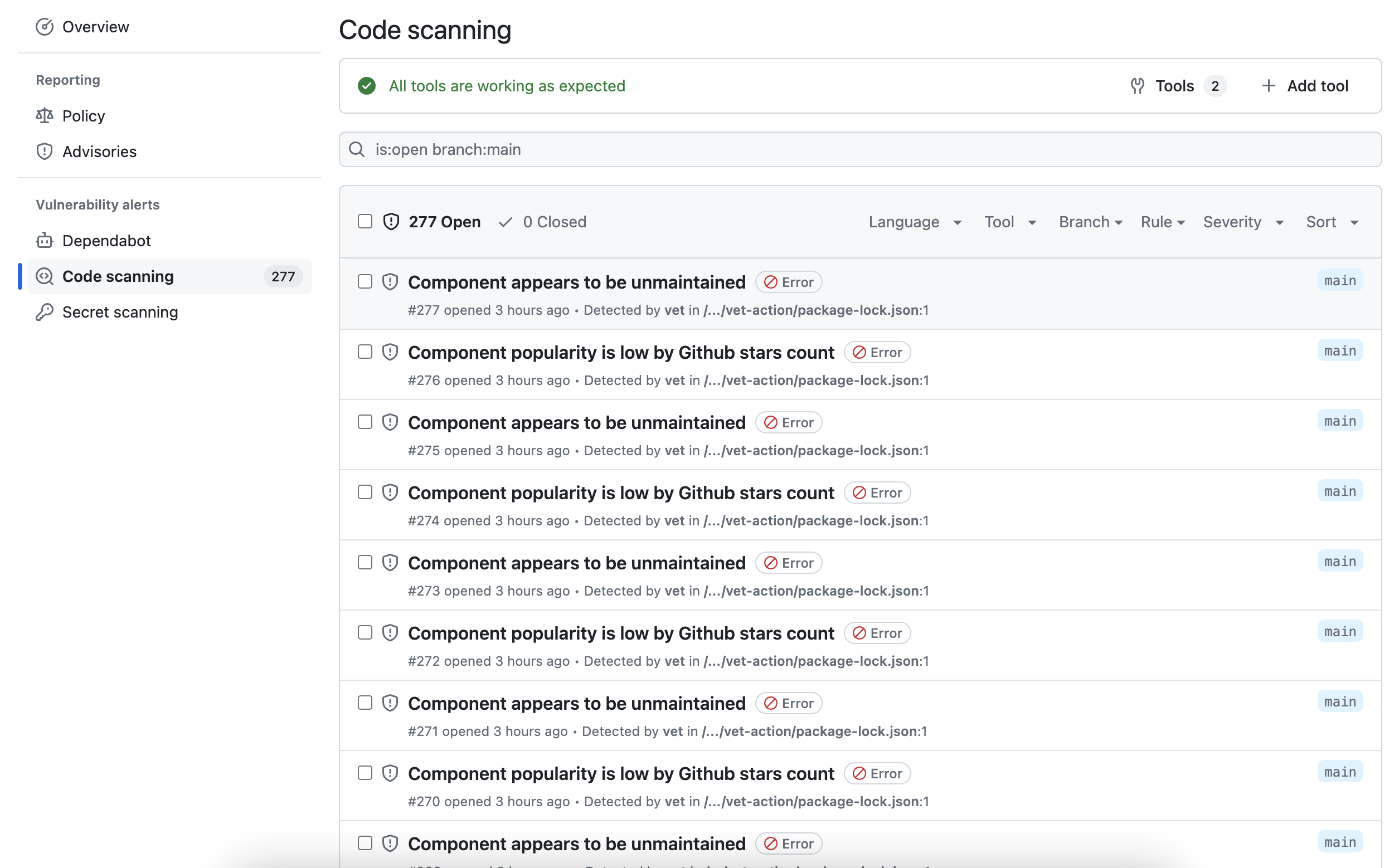
Once uploaded, policy violations appear in the GitHub Security tab, giving a centralized view across repositories.
 ## Pull Request Integration
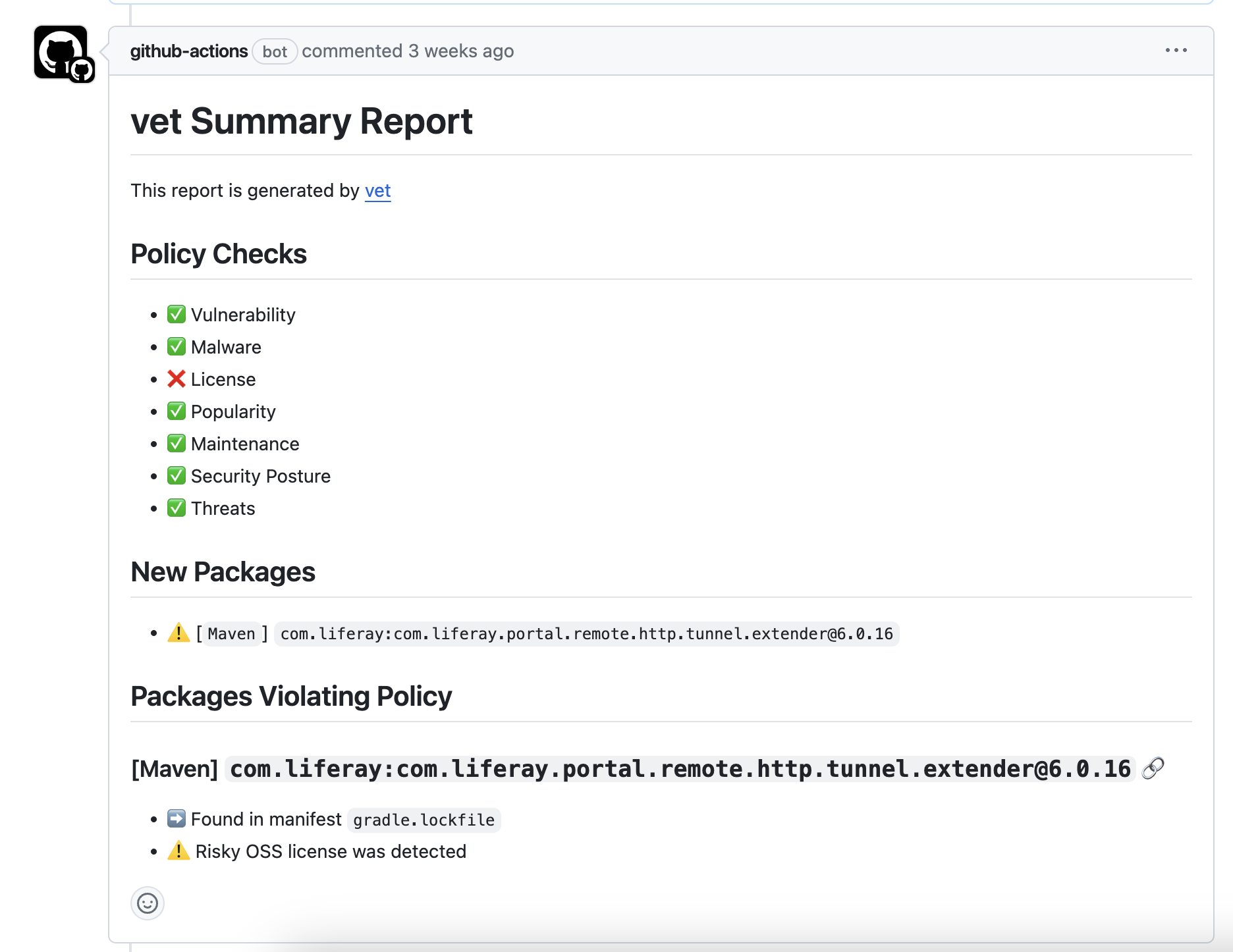
The GitHub Action adds a comment to pull requests when security issues are found:
## Pull Request Integration
The GitHub Action adds a comment to pull requests when security issues are found:
 ## Best Practices
For production workflows, pin third-party GitHub Actions to a full commit SHA rather than a mutable tag. This protects against tag-moving attacks, where a compromised upstream action could inject malicious code.
```yaml theme={null}
# Instead of:
uses: actions/checkout@v4
# Pin to a specific commit SHA:
uses: actions/checkout@11bd71901bbe5b1630ceea73d27597364c9af683 # v4
```
The [actions/checkout](https://github.com/actions/checkout/releases) and [github/codeql-action](https://github.com/github/codeql-action/releases) release pages list the commit SHA for each release. `safedep/vet-action` uses [semantic versioning tags](https://github.com/safedep/vet-action/releases) maintained directly by SafeDep.
## Troubleshooting
Ensure the `security-events: write` permission is set in your workflow file and that Code Scanning is enabled for your repository.
Check that your policy configuration is correct and that violations actually exist. Use `--report-json` locally to debug.
View the complete documentation and examples
See a complete GitHub Actions workflow example
## Best Practices
For production workflows, pin third-party GitHub Actions to a full commit SHA rather than a mutable tag. This protects against tag-moving attacks, where a compromised upstream action could inject malicious code.
```yaml theme={null}
# Instead of:
uses: actions/checkout@v4
# Pin to a specific commit SHA:
uses: actions/checkout@11bd71901bbe5b1630ceea73d27597364c9af683 # v4
```
The [actions/checkout](https://github.com/actions/checkout/releases) and [github/codeql-action](https://github.com/github/codeql-action/releases) release pages list the commit SHA for each release. `safedep/vet-action` uses [semantic versioning tags](https://github.com/safedep/vet-action/releases) maintained directly by SafeDep.
## Troubleshooting
Ensure the `security-events: write` permission is set in your workflow file and that Code Scanning is enabled for your repository.
Check that your policy configuration is correct and that violations actually exist. Use `--report-json` locally to debug.
View the complete documentation and examples
See a complete GitHub Actions workflow example