> ## Documentation Index
> Fetch the complete documentation index at: https://docs.safedep.io/llms.txt
> Use this file to discover all available pages before exploring further.
# Dependency Inventory
> Generate accurate dependency inventories using package managers and SBOM tools
Package managers such as Maven, Gradle, and npm have the most accurate view of library dependencies. They resolve exact versions and can generate an SBOM for `vet` to scan with higher fidelity. This guide uses the [CycloneDX Gradle plugin](https://github.com/CycloneDX/cyclonedx-gradle-plugin) to generate an SBOM and scan it with `vet`.
## Gradle Integration
The CycloneDX Gradle plugin generates SBOMs that `vet` can analyze for security issues.
### Plugin Configuration
Add the CycloneDX plugin to your `build.gradle` file:
```groovy theme={null}
plugins {
id 'org.cyclonedx.bom' version '1.10.0'
}
cyclonedxBom {
includeConfigs = ["runtimeClasspath"]
skipConfigs = ["compileClasspath", "testCompileClasspath"]
skipProjects = [rootProject.name, "yourTestSubProject"]
projectType = "application"
schemaVersion = "1.6"
destination = file("build/reports")
outputName = "bom"
outputFormat = "json"
includeBomSerialNumber = false
includeLicenseText = false
includeMetadataResolution = true
componentVersion = "2.0.0"
componentName = "my-component"
}
```
### Configuration Options
**includeConfigs**: Which dependency configurations to include
```groovy theme={null}
includeConfigs = [
"runtimeClasspath", // Runtime dependencies
"implementationClasspath", // Implementation dependencies
"compileClasspath" // Compile-time dependencies
]
```
**skipConfigs** and **skipProjects**: Exclude unnecessary components
```groovy theme={null}
skipConfigs = ["testCompileClasspath", "testRuntimeClasspath"]
skipProjects = ["test-utils", "benchmarks"]
```
**destination** and **outputName**: Control where SBOMs are generated
```groovy theme={null}
destination = file("security/sboms")
outputName = "${project.name}-${project.version}-sbom"
outputFormat = "json" // or "xml"
```
### SBOM Generation
Generate SBOM artifacts with a clean build:
```bash theme={null}
gradle clean build cyclonedxBom
```
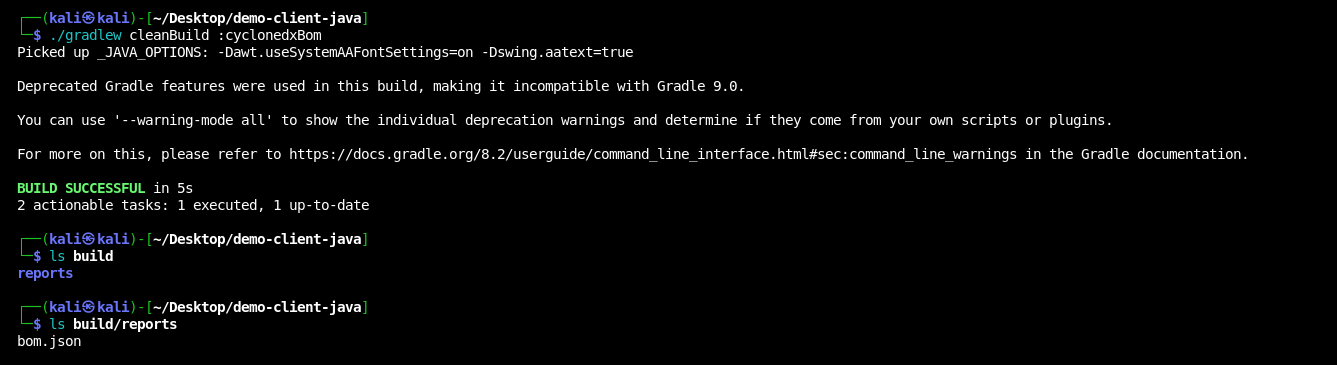 After a successful build, SBOM artifacts are stored in the `build/reports` directory.
## Multi-Project Configuration
For multi-module projects, configure the plugin in each module or use a shared configuration in the root `build.gradle`:
```groovy theme={null}
subprojects {
apply plugin: 'org.cyclonedx.bom'
cyclonedxBom {
includeConfigs = ["runtimeClasspath"]
projectType = "library"
destination = file("${rootProject.buildDir}/reports/sboms")
outputName = "${project.name}-bom"
}
}
```
## Maven Integration
For Maven projects, use the CycloneDX Maven plugin:
```xml theme={null}
org.cyclonedx
cyclonedx-maven-plugin
2.8.0
application
1.6
false
true
bom
json
package
makeAggregateBom
```
Generate the SBOM:
```bash theme={null}
mvn clean package cyclonedx:makeAggregateBom
```
## Scanning SBOMs with Vet
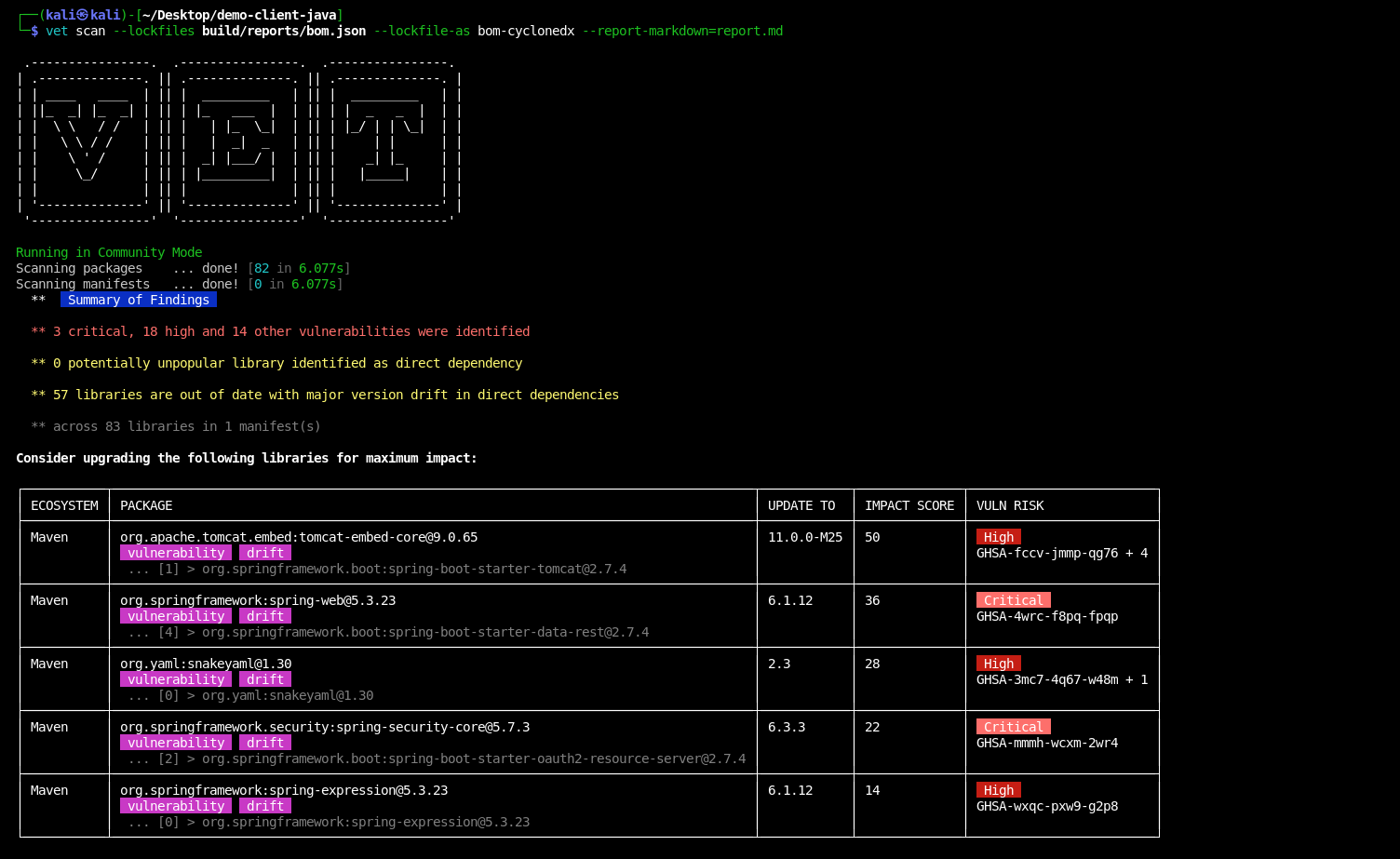
Once you have generated SBOM files, scan them with `vet`:
### CycloneDX Format
```bash theme={null}
vet scan --lockfiles build/reports/bom.json \
--lockfile-as bom-cyclonedx \
--report-markdown=report.md
```
After a successful build, SBOM artifacts are stored in the `build/reports` directory.
## Multi-Project Configuration
For multi-module projects, configure the plugin in each module or use a shared configuration in the root `build.gradle`:
```groovy theme={null}
subprojects {
apply plugin: 'org.cyclonedx.bom'
cyclonedxBom {
includeConfigs = ["runtimeClasspath"]
projectType = "library"
destination = file("${rootProject.buildDir}/reports/sboms")
outputName = "${project.name}-bom"
}
}
```
## Maven Integration
For Maven projects, use the CycloneDX Maven plugin:
```xml theme={null}
org.cyclonedx
cyclonedx-maven-plugin
2.8.0
application
1.6
false
true
bom
json
package
makeAggregateBom
```
Generate the SBOM:
```bash theme={null}
mvn clean package cyclonedx:makeAggregateBom
```
## Scanning SBOMs with Vet
Once you have generated SBOM files, scan them with `vet`:
### CycloneDX Format
```bash theme={null}
vet scan --lockfiles build/reports/bom.json \
--lockfile-as bom-cyclonedx \
--report-markdown=report.md
```
 ## npm/Node.js Integration
For Node.js projects, use the CycloneDX npm plugin:
```bash theme={null}
# Install globally
npm install -g @cyclonedx/cyclonedx-npm
# Generate SBOM
cyclonedx-npm --output-file sbom.json
# Scan with vet
vet scan --lockfiles sbom.json --lockfile-as bom-cyclonedx
```
## Python Integration
For Python projects, use cyclonedx-python:
```bash theme={null}
# Install
pip install cyclonedx-bom
# Generate SBOM (subcommand depends on project type: environment, requirements, poetry, pipenv)
cyclonedx-py environment -o sbom.json
# Scan with vet
vet scan --lockfiles sbom.json --lockfile-as bom-cyclonedx
```
## CI/CD Integration
```yaml theme={null}
name: Dependency Inventory Scan
on: [push, pull_request]
jobs:
inventory-scan:
runs-on: ubuntu-latest
steps:
- uses: actions/checkout@v4
- name: Set up JDK
uses: actions/setup-java@v4
with:
java-version: '17'
distribution: 'temurin'
- name: Generate SBOM
run: ./gradlew cyclonedxBom
- name: Scan SBOM with vet
run: |
docker run --rm -v "$PWD:/app" ghcr.io/safedep/vet:latest \
scan --lockfiles /app/build/reports/bom.json \
--lockfile-as bom-cyclonedx
- name: Upload SBOM
uses: actions/upload-artifact@v4
with:
name: sbom
path: build/reports/bom.json
```
```yaml theme={null}
stages:
- build
- security
generate-sbom:
stage: build
script:
- ./gradlew clean build cyclonedxBom
artifacts:
paths:
- build/reports/bom.json
expire_in: 1 hour
security-scan:
stage: security
image: ghcr.io/safedep/vet:latest
script:
- vet scan --lockfiles build/reports/bom.json --lockfile-as bom-cyclonedx --report-json security-report.json
dependencies:
- generate-sbom
artifacts:
reports:
security: security-report.json
```
## Configuration Notes
Control which dependencies appear in the SBOM by setting `includeConfigs` and `skipConfigs` in your `build.gradle` (shown above). For example, list only `runtimeClasspath` for a production SBOM, or add `testRuntimeClasspath` to include test dependencies.
Store SBOMs alongside releases for compliance and audit:
```bash theme={null}
# Tag SBOMs with version information
cp build/reports/bom.json "release-artifacts/sbom-v${VERSION}.json"
```
Complete documentation for the Gradle plugin
Maven plugin documentation and examples
Learn more about generating SBOMs with Vet
See all supported package managers in Vet
## npm/Node.js Integration
For Node.js projects, use the CycloneDX npm plugin:
```bash theme={null}
# Install globally
npm install -g @cyclonedx/cyclonedx-npm
# Generate SBOM
cyclonedx-npm --output-file sbom.json
# Scan with vet
vet scan --lockfiles sbom.json --lockfile-as bom-cyclonedx
```
## Python Integration
For Python projects, use cyclonedx-python:
```bash theme={null}
# Install
pip install cyclonedx-bom
# Generate SBOM (subcommand depends on project type: environment, requirements, poetry, pipenv)
cyclonedx-py environment -o sbom.json
# Scan with vet
vet scan --lockfiles sbom.json --lockfile-as bom-cyclonedx
```
## CI/CD Integration
```yaml theme={null}
name: Dependency Inventory Scan
on: [push, pull_request]
jobs:
inventory-scan:
runs-on: ubuntu-latest
steps:
- uses: actions/checkout@v4
- name: Set up JDK
uses: actions/setup-java@v4
with:
java-version: '17'
distribution: 'temurin'
- name: Generate SBOM
run: ./gradlew cyclonedxBom
- name: Scan SBOM with vet
run: |
docker run --rm -v "$PWD:/app" ghcr.io/safedep/vet:latest \
scan --lockfiles /app/build/reports/bom.json \
--lockfile-as bom-cyclonedx
- name: Upload SBOM
uses: actions/upload-artifact@v4
with:
name: sbom
path: build/reports/bom.json
```
```yaml theme={null}
stages:
- build
- security
generate-sbom:
stage: build
script:
- ./gradlew clean build cyclonedxBom
artifacts:
paths:
- build/reports/bom.json
expire_in: 1 hour
security-scan:
stage: security
image: ghcr.io/safedep/vet:latest
script:
- vet scan --lockfiles build/reports/bom.json --lockfile-as bom-cyclonedx --report-json security-report.json
dependencies:
- generate-sbom
artifacts:
reports:
security: security-report.json
```
## Configuration Notes
Control which dependencies appear in the SBOM by setting `includeConfigs` and `skipConfigs` in your `build.gradle` (shown above). For example, list only `runtimeClasspath` for a production SBOM, or add `testRuntimeClasspath` to include test dependencies.
Store SBOMs alongside releases for compliance and audit:
```bash theme={null}
# Tag SBOMs with version information
cp build/reports/bom.json "release-artifacts/sbom-v${VERSION}.json"
```
Complete documentation for the Gradle plugin
Maven plugin documentation and examples
Learn more about generating SBOMs with Vet
See all supported package managers in Vet