> ## Documentation Index
> Fetch the complete documentation index at: https://docs.safedep.io/llms.txt
> Use this file to discover all available pages before exploring further.
# Vet Quickstart
> Get started with Vet in under 5 minutes
For SafeDep Cloud, refer to [Cloud Quickstart](/governance/cloud/quickstart)
Use [SafeDep Vet](https://github.com/safedep/vet) to detect security risks and apply policy-based controls that block vulnerable or malicious open source dependencies.
## Installation
```bash theme={null}
brew tap safedep/tap
brew install safedep/tap/vet
```
```bash theme={null}
docker run --rm -it ghcr.io/safedep/vet:latest version
```
Download a pre-built binary suitable for your OS at [GitHub Releases](https://github.com/safedep/vet/releases)
For additional installation options, see [Vet's README](https://github.com/safedep/vet).
## Running Your First Scan
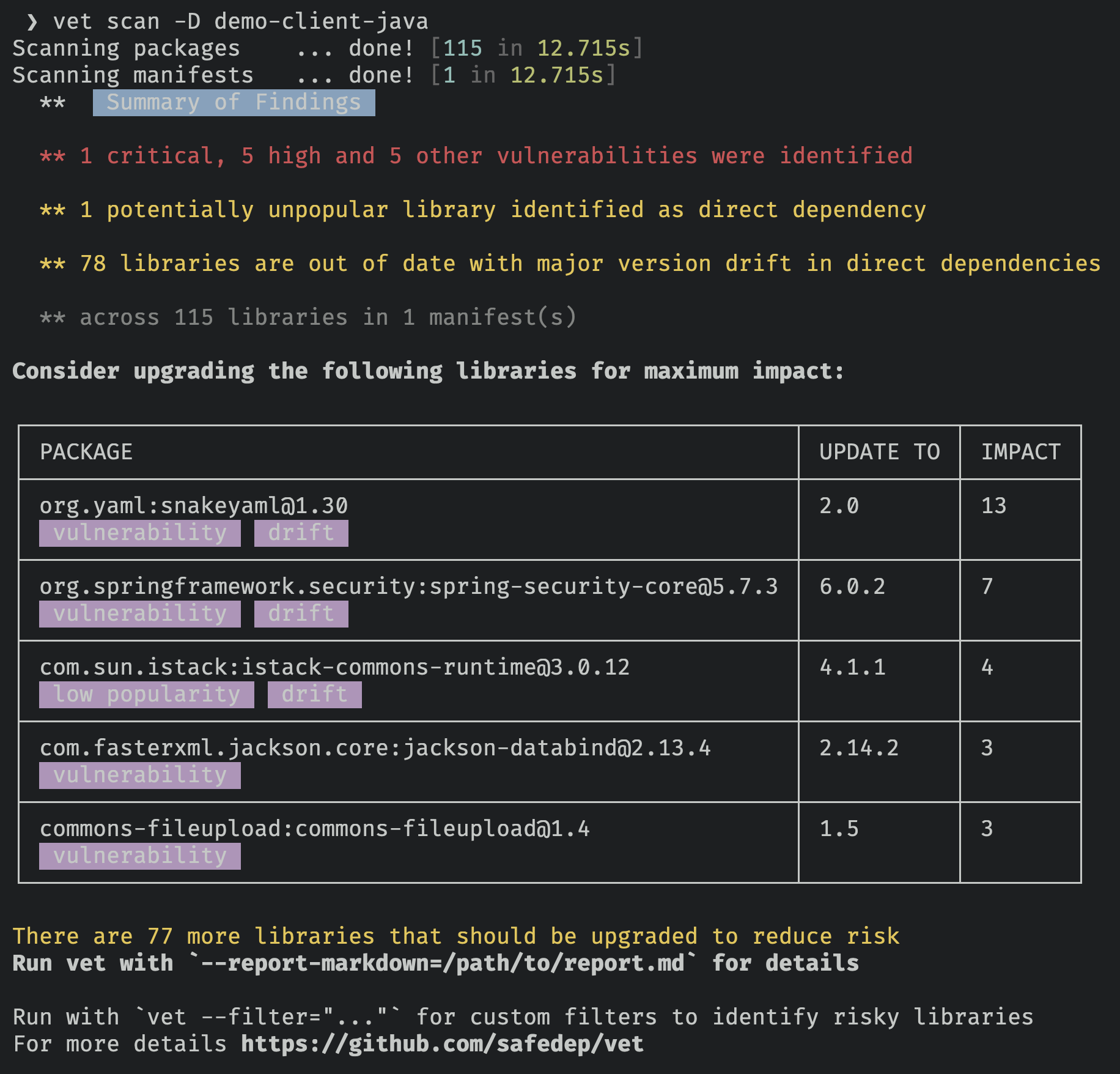
Scan a source code repository, auto-discovering well-known manifest files:
```bash theme={null}
vet scan -D /path/to/dir
```
 ### Other scanning options
```bash theme={null}
vet scan -M package-lock.json
```
```bash theme={null}
vet scan --purl pkg:npm/express@4.18.2
```
```bash theme={null}
vet scan -M /path/to/my-app.jar
```
```bash theme={null}
vet scan --image ghcr.io/safedep/vet:latest
```
For more scanning options, see [Vet's README](https://github.com/safedep/vet).
## Policy as Code
`vet` supports a [CEL](https://cel.dev/)-based policy language for identifying risks. Scan and fail on critical or high vulnerabilities:
```bash theme={null}
vet scan -D /path/to/dir \
--filter '(vulns.critical.size() > 0) || (vulns.high.size() > 0)' \
--filter-fail
```
### Advanced Policy Configuration
Combine multiple CEL queries into a policy suite ([example](https://github.com/safedep/vet/blob/main/samples/filter-suites/fs-generic.yml)) and audit your application:
```bash theme={null}
vet scan -D /path/to/dir \
--filter-suite /path/to/policy.yml \
--filter-fail
```
## Setup CI/CD Guardrails
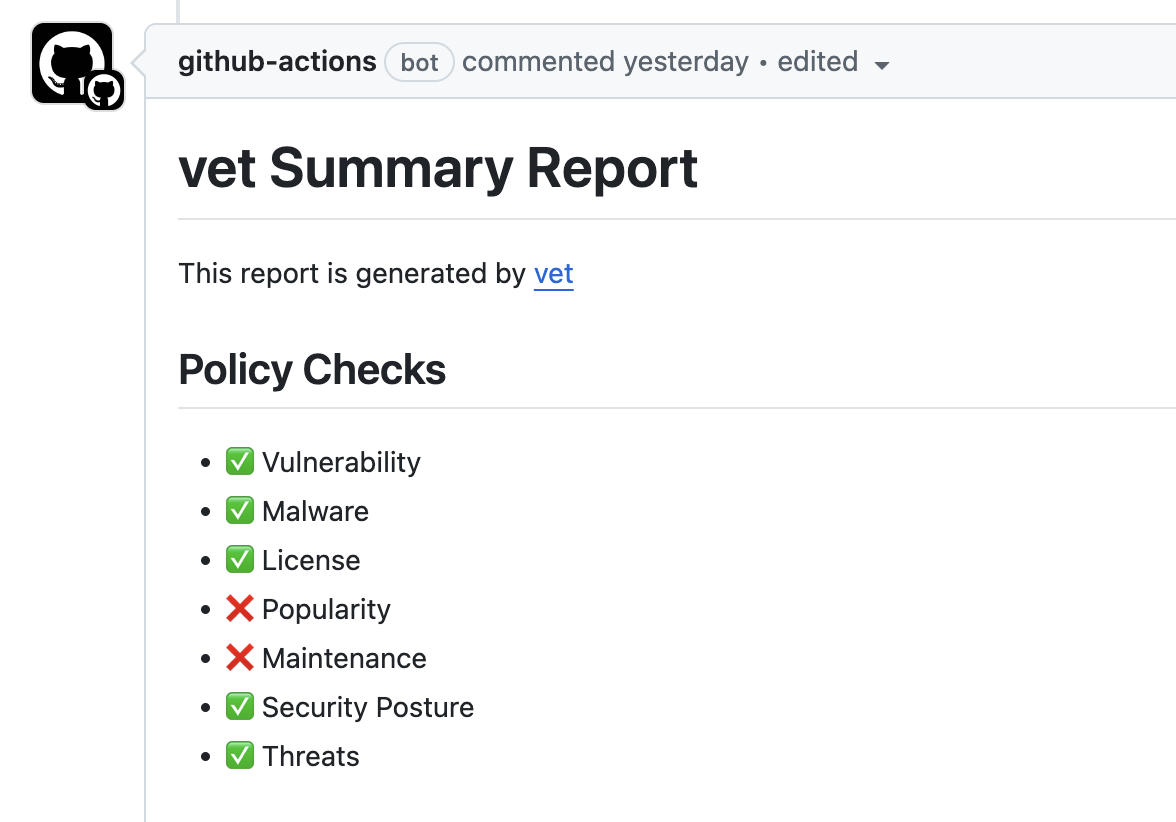
`vet` includes a native [GitHub Action](https://github.com/safedep/vet-action) for policy-driven guardrails against risky OSS components.
### Other scanning options
```bash theme={null}
vet scan -M package-lock.json
```
```bash theme={null}
vet scan --purl pkg:npm/express@4.18.2
```
```bash theme={null}
vet scan -M /path/to/my-app.jar
```
```bash theme={null}
vet scan --image ghcr.io/safedep/vet:latest
```
For more scanning options, see [Vet's README](https://github.com/safedep/vet).
## Policy as Code
`vet` supports a [CEL](https://cel.dev/)-based policy language for identifying risks. Scan and fail on critical or high vulnerabilities:
```bash theme={null}
vet scan -D /path/to/dir \
--filter '(vulns.critical.size() > 0) || (vulns.high.size() > 0)' \
--filter-fail
```
### Advanced Policy Configuration
Combine multiple CEL queries into a policy suite ([example](https://github.com/safedep/vet/blob/main/samples/filter-suites/fs-generic.yml)) and audit your application:
```bash theme={null}
vet scan -D /path/to/dir \
--filter-suite /path/to/policy.yml \
--filter-fail
```
## Setup CI/CD Guardrails
`vet` includes a native [GitHub Action](https://github.com/safedep/vet-action) for policy-driven guardrails against risky OSS components.
 Setup Vet with GitHub Actions and Code Scanning
Integrate Vet with GitLab CI/CD pipelines
Learn advanced policy configuration with CEL
Scale across your organization with SafeDep Cloud
## What's Next?
* See the [Vet GitHub Repository](https://github.com/safedep/vet) for the latest documentation on usage and advanced features.
* For `vet`'s complete commands, sub-commands, flags, and usage documentation, see the [Vet CLI Reference Manual](https://safedep.github.io/vet).
Setup Vet with GitHub Actions and Code Scanning
Integrate Vet with GitLab CI/CD pipelines
Learn advanced policy configuration with CEL
Scale across your organization with SafeDep Cloud
## What's Next?
* See the [Vet GitHub Repository](https://github.com/safedep/vet) for the latest documentation on usage and advanced features.
* For `vet`'s complete commands, sub-commands, flags, and usage documentation, see the [Vet CLI Reference Manual](https://safedep.github.io/vet).