> ## Documentation Index
> Fetch the complete documentation index at: https://docs.safedep.io/llms.txt
> Use this file to discover all available pages before exploring further.
# JFrog Xray Integration
> Stream SafeDep malware intelligence to JFrog Xray
The JFrog Xray Integration is available on **SafeDep Professional and Enterprise** plans only. [Upgrade your plan](https://safedep.io/pricing) to access this feature.
The JFrog Xray integration runs as a daemon. It polls SafeDep for verified malicious packages
and pushes them to JFrog Xray as Custom Issues. With a blocking policy in place, Xray blocks
those packages for every developer on that instance.
## Prerequisites
* SafeDep CLI installed ([install](https://github.com/safedep/cli#safedep-cli))
* JFrog instance with Xray enabled
* JFrog Xray scoped [Access Token](https://docs.jfrog.com/administration/docs/access-tokens)
* *Optional*, for blocking malicious packages on developer machines or CIs
* JFrog Xray Malware security `policy` and repository `watch` with a block action configured
## How It Works
```bash theme={null}
# Option 1: OAuth device flow
safedep auth login
# Option 2: API key login (--api-key is a flag; pass the value with --api-key-value)
safedep auth login --tenant your-tenant.safedep.io --api-key --api-key-value YOUR_API_KEY
# Option 3: Environment variables (read directly by safedep; no login command needed)
export SAFEDEP_TENANT_ID=your-tenant.safedep.io
export SAFEDEP_API_KEY=YOUR_API_KEY
```
```bash theme={null}
safedep integration jfrog run \
--instance-url https://yourcompany.jfrog.io \
--instance-access-token YOUR_JFROG_TOKEN
# or pass token via environment variable (see Environment Variables below)
```
The daemon polls SafeDep continuously (default: every 60 seconds) and pushes any newly
verified malicious packages to Xray.
```text Output theme={null}
i Validating JFrog connectivity
✓ JFrog connectivity OK (URL + token verified)
i Starting JFrog feed poller (interval: 1m0s)
✓ Pushed: @hideliar/9router@0.4.25 (npm)
i JFrog: SD-01KR3WJYFTSNZFFS5CFNYVGZFH [201]
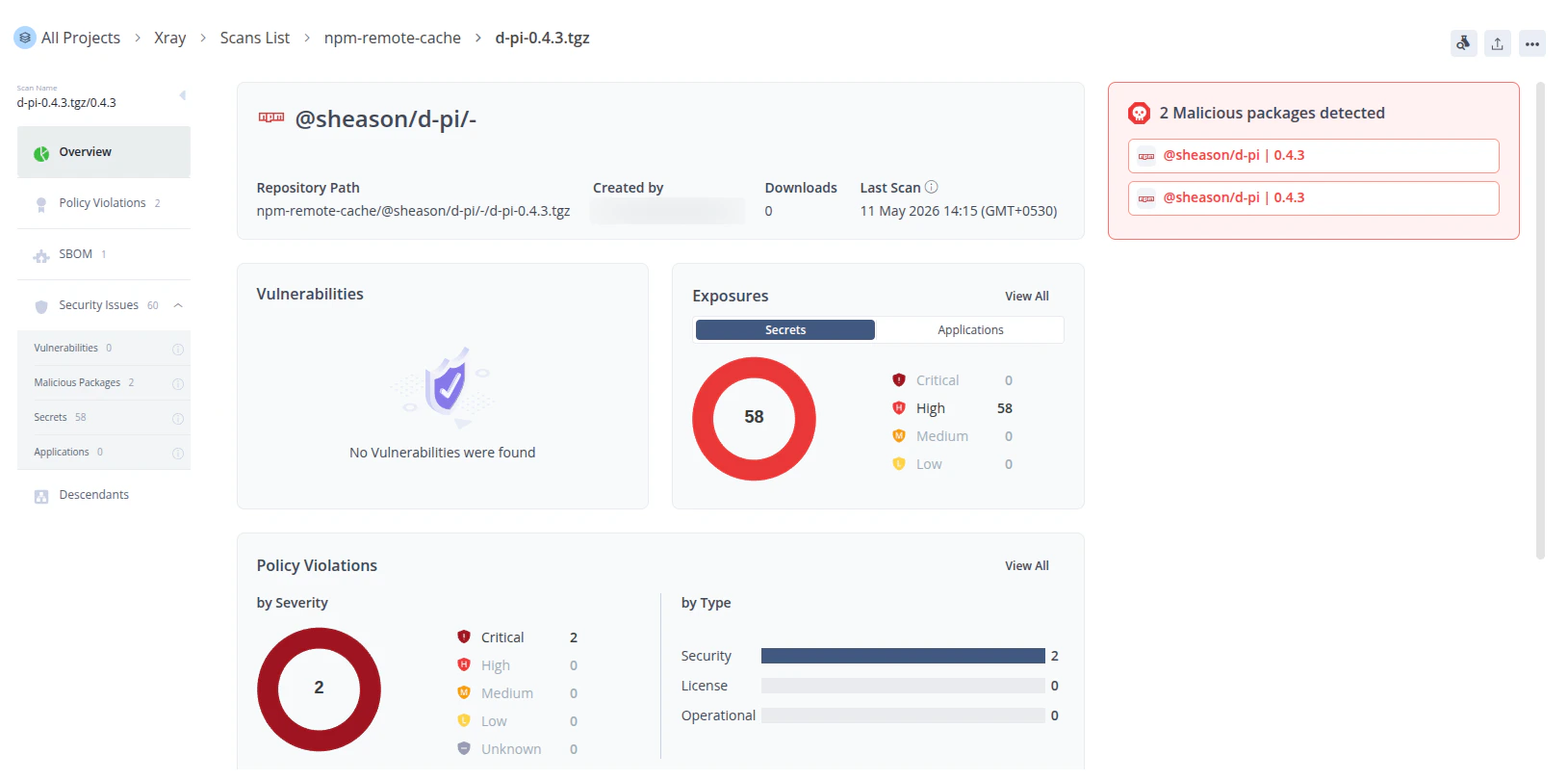
✓ Pushed: @sheason/d-pi@0.4.3 (npm)
i JFrog: SD-01KR3XSCZ0WNAEYY6CNMD4CQH3 [201]
i Poll cycle complete, next in 1m0s
...
..
.
```
Assumes a Malicious Package blocking policy and watch configured for the target repository (e.g. `npm-remote`).
```bash theme={null}
jf npm install @sheason/d-pi@0.4.3
```
`jf npm install` triggers Xray to index `@sheason/d-pi@0.4.3`. If SafeDep has flagged that package as malicious, Xray raises a policy violation and blocks the download.
```text Install Output theme={null}
npm ERR! 403 on a server you do not have access to.
{
"error": {
"code": "E403",
"summary": "403 Forbidden - GET https://yourcompany.jfrog.io/artifactory/api/npm/npm-virtual/@sheason/d-pi/-/d-pi-0.4.3.tgz",
"detail": "In most cases, you or one of your dependencies are requesting\na package version that is forbidden by your security policy, or\non a server you do not have access to."
}
}
```
 ## Limitations
#### Malicious Packages Blocking
`npm` and other package managers cache packages locally on developer machines. If a developer installs a package before SafeDep flags it, the cached copy remains accessible even after the integration pushes it to Xray.
Running `npm cache clean --force` removes the cached copy, but it clears the entire local cache and forces a full re-download of all packages.
```bash theme={null}
npm cache clean --force
```
## Configuration
### CLI Flags
| Flag | Required | Default | Description |
| ------------------------- | -------- | ----------- | ------------------------------------------------- |
| `--instance-url` | Yes\* | None | JFrog instance base URL. Must use `https://`. |
| `--instance-access-token` | Yes\* | None | JFrog access token scoped to Xray. |
| `--poll-interval` | No | `60s` | Duration between poll cycles (`30s`, `5m`, `1h`). |
| `--profile` | No | `"default"` | SafeDep credential profile. |
\*Required unless the corresponding environment variable is set.
### Environment Variables
For server deployments or CI pipelines, use environment variables to avoid passing secrets as CLI flags. When both are set, flags take precedence.
| Variable | Corresponding Flag |
| ---------------------------------------------------- | ------------------------- |
| `SAFEDEP_INTEGRATION_JFROG_ARTIFACTORY_URL` | `--instance-url` |
| `SAFEDEP_INTEGRATION_JFROG_ARTIFACTORY_ACCESS_TOKEN` | `--instance-access-token` |
**Example: environment variable setup**
```bash theme={null}
export SAFEDEP_INTEGRATION_JFROG_ARTIFACTORY_URL=https://yourcompany.jfrog.io
export SAFEDEP_INTEGRATION_JFROG_ARTIFACTORY_ACCESS_TOKEN=***
safedep integration jfrog run
```
Block malicious packages at install time and in CI/CD.
Block malicious installs on the developer machine.
How SafeDep detects malicious packages.
Centralize policy and visibility across your org.
## Limitations
#### Malicious Packages Blocking
`npm` and other package managers cache packages locally on developer machines. If a developer installs a package before SafeDep flags it, the cached copy remains accessible even after the integration pushes it to Xray.
Running `npm cache clean --force` removes the cached copy, but it clears the entire local cache and forces a full re-download of all packages.
```bash theme={null}
npm cache clean --force
```
## Configuration
### CLI Flags
| Flag | Required | Default | Description |
| ------------------------- | -------- | ----------- | ------------------------------------------------- |
| `--instance-url` | Yes\* | None | JFrog instance base URL. Must use `https://`. |
| `--instance-access-token` | Yes\* | None | JFrog access token scoped to Xray. |
| `--poll-interval` | No | `60s` | Duration between poll cycles (`30s`, `5m`, `1h`). |
| `--profile` | No | `"default"` | SafeDep credential profile. |
\*Required unless the corresponding environment variable is set.
### Environment Variables
For server deployments or CI pipelines, use environment variables to avoid passing secrets as CLI flags. When both are set, flags take precedence.
| Variable | Corresponding Flag |
| ---------------------------------------------------- | ------------------------- |
| `SAFEDEP_INTEGRATION_JFROG_ARTIFACTORY_URL` | `--instance-url` |
| `SAFEDEP_INTEGRATION_JFROG_ARTIFACTORY_ACCESS_TOKEN` | `--instance-access-token` |
**Example: environment variable setup**
```bash theme={null}
export SAFEDEP_INTEGRATION_JFROG_ARTIFACTORY_URL=https://yourcompany.jfrog.io
export SAFEDEP_INTEGRATION_JFROG_ARTIFACTORY_ACCESS_TOKEN=***
safedep integration jfrog run
```
Block malicious packages at install time and in CI/CD.
Block malicious installs on the developer machine.
How SafeDep detects malicious packages.
Centralize policy and visibility across your org.