

SafeDep now supports Bitbucket Cloud integration using Bitbucket Pipes. Using Pipes, SafeDep can be integrated into any Bitbucket CI/CD workflow.Documentation Index
Fetch the complete documentation index at: https://docs.safedep.io/llms.txt
Use this file to discover all available pages before exploring further.
Prerequisites
Bitbucket Account
Bitbucket account with access to your project
Repository
A source code repository to integrate SafeDep in
pipelines.Quick Start
1. Enable CI on Your Project
If you don’t already have abitbucket-pipelines.yml, create one
2. Add SafeDep in your pipeline
On Pull Request
vet-pipe includes a feature to scan only the packages changed within a Pull Request. However, this functionality relies on environment variables — such as BITBUCKET_PR_DESTINATION_BRANCH — which are only populated when using Bitbucket’s pull-requests pipeline trigger.
To enable changed packages scanning for PRs while still supporting Push and Merge events, you must configure both the pull-requests and default (or branches) triggers. The most efficient way to implement this without code redundancy is as follows:
Reports
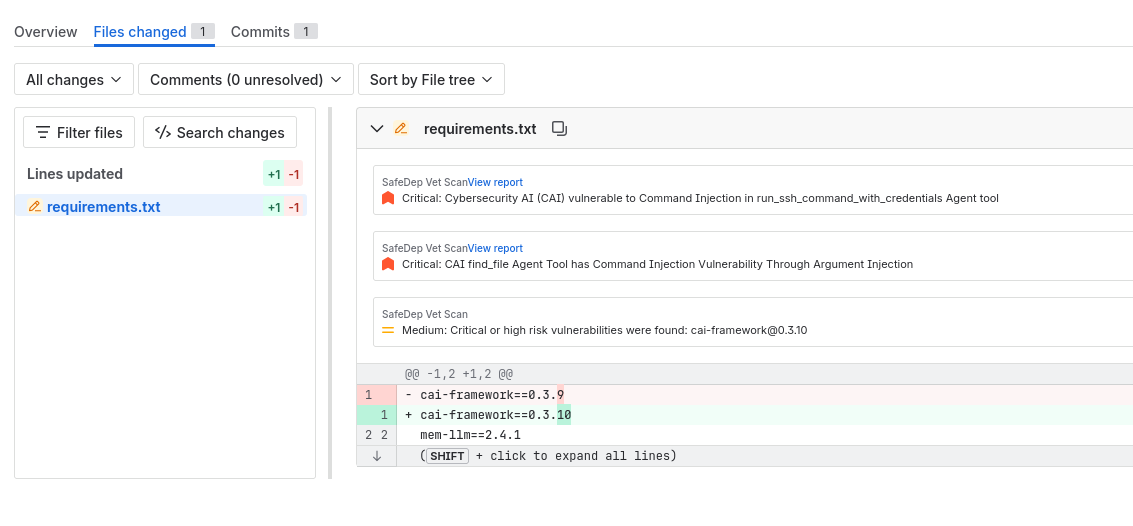
vet-pipe supports Bitbucket Native Code Insights Reports, each Pull Request or Push has reports associated with them,
the findings are attached to their respective files which are then visible in the Bitbucket UI.
Inputs
vet-pipe accepts many inputs (aka variables) that you can specify when running the pipe.
Cloud Sync
Cloud Sync requires a subscription to SafeDep Cloud.
CLOUD_KEY and CLOUD_TENANT values from https://app.safedep.io
To create these:
- Sign Up / Login to https://app.safedep.io
- Create your Tenant
- Go to Settings
- Go to API Keys
- Then create
API Key
Policy Customization
Policy customization is optional. SafeDep Pipe comes with default policies.
POLICY variable.
See Policy as Code for more details.
When a policy violation occurs, the pipeline fails. To overwrite this, set
SKIP_FILTER_CI_FAIL: "true" in variables, to skip fail when a policy violation happens.Other Inputs
See thevet-pipe Bitbucket repo for more detail about other available inputs.
Artifact
Eachvet execution produces a vet-report.json file,
which is generated by applying the --report-json flag in the vet command.
This generated file can be downloaded by setting the artifact property in bitbucket-pipelines.yml