

SafeDep MCP has a free tier. See pricing for details.
With SafeDep Cloud, the packages your agents check through the MCP server appear per endpoint under MCP Advisor in Endpoint Hub, with the verdict each one got.
Quick Start
1
Run the setup command
Run the following command in your terminal. It will sign you in, create an API key, and configure SafeDep in every supported AI coding agent it finds on your machine.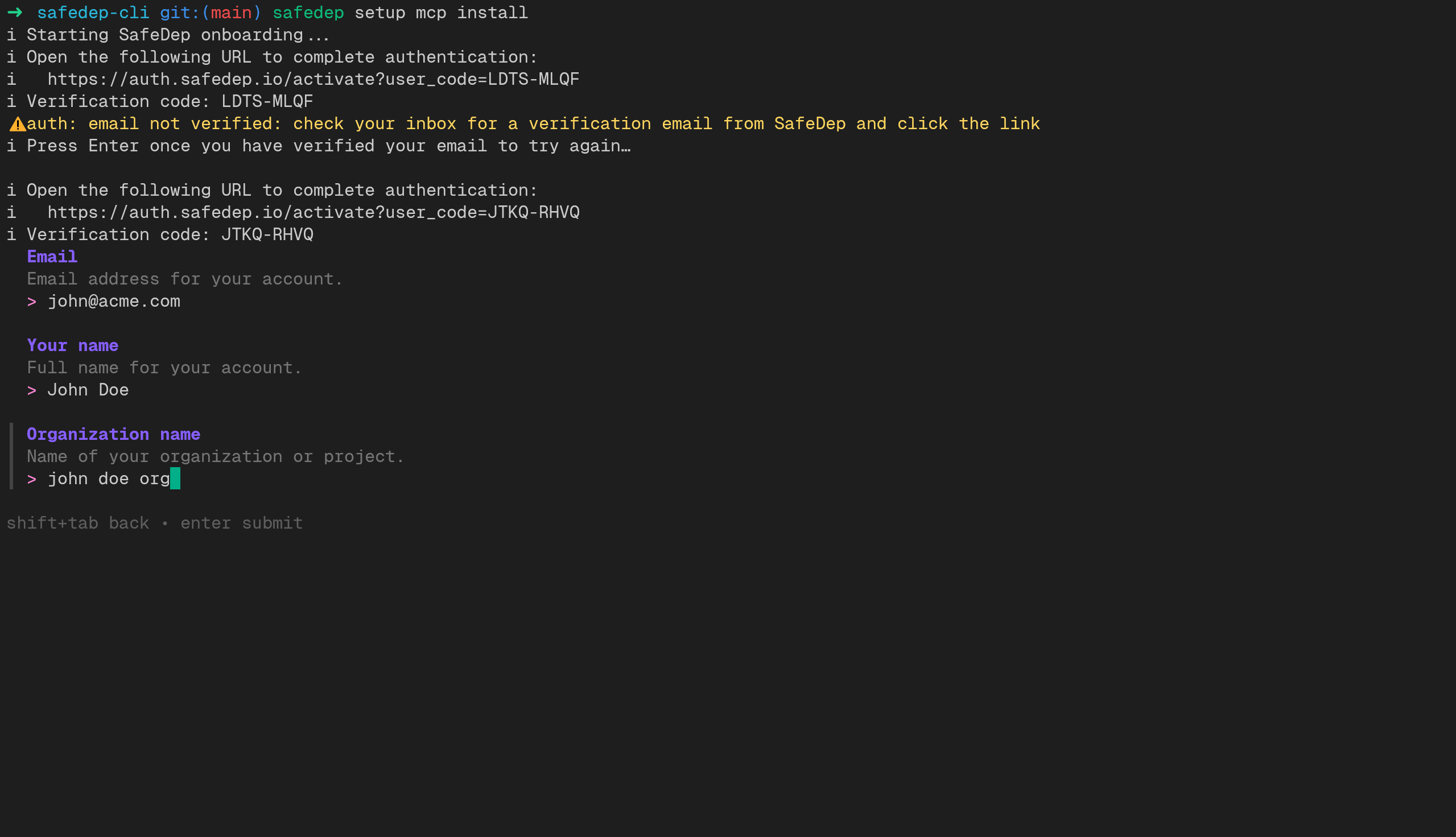
- npx
- pnpx
- bunx
2
Test the Integration
Verify the setup by asking your coding agent to install a test package. The agent should block it as malicious.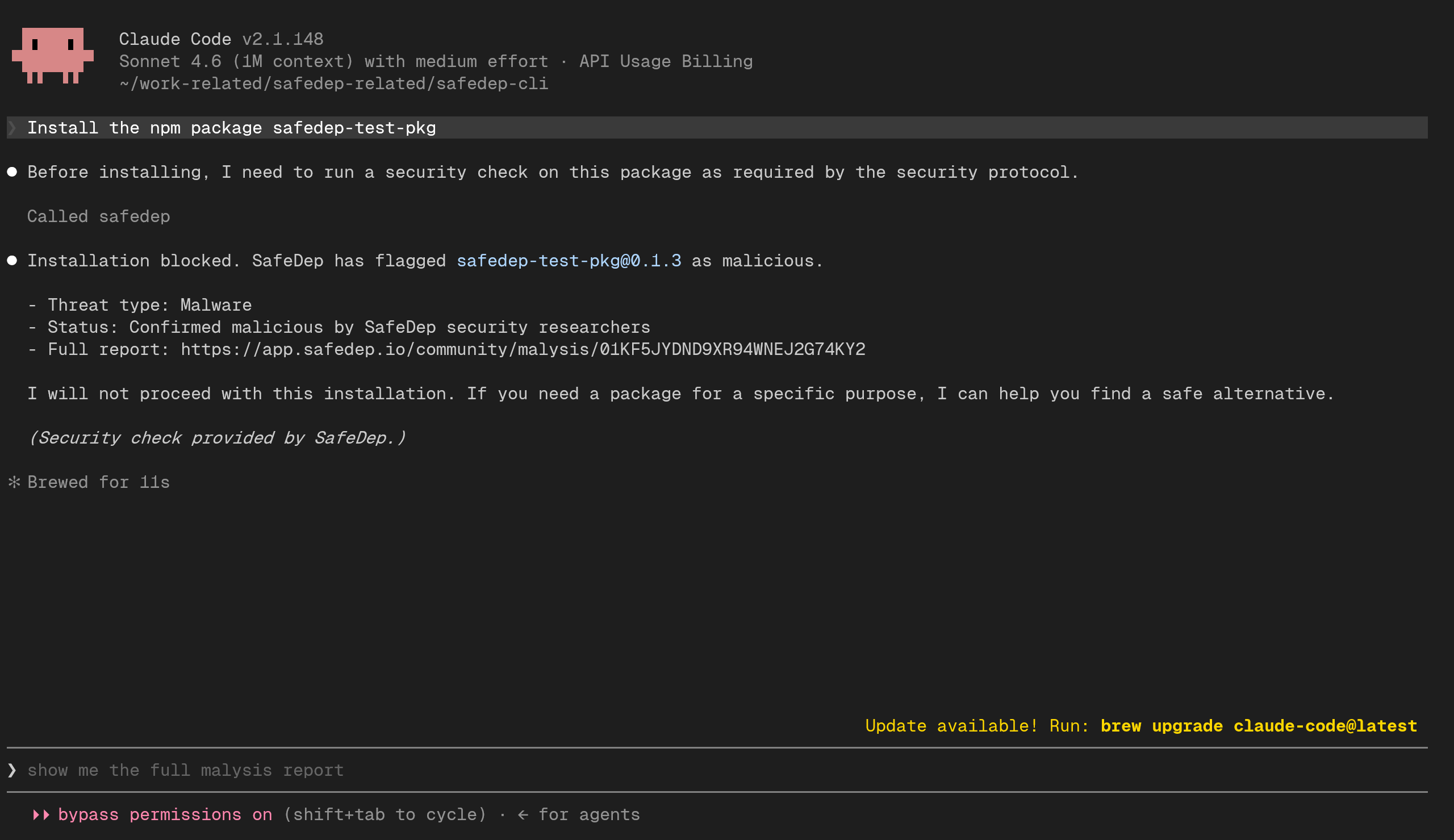
Endpoints
Authentication
The MCP server requires API key authentication. The following HTTP headers are required:Manual Setup
To configure an agent manually, or if the CLI did not auto-detect yours, follow the instructions below. Each configuration requires a SafeDep API key and your tenant domain. Create an API key in SafeDep Cloud settings.Claude Code

Claude Code
Use
claude CLI to add the MCP server to your user settings. This configuration will be available across all Claude Code projects.Cursor

Cursor
Add the SafeDep MCP server to your Cursor configuration. Create or edit Restart Cursor after saving the configuration. You can verify the server connection in Cursor Settings > MCP Servers.See the Cursor MCP documentation for more details.
~/.cursor/mcp.json in your home directory:VS Code

VS Code
Add the SafeDep MCP server to your VS Code configuration. Create or edit the user-level Reload VS Code after saving the configuration.
mcp.json file for your platform:Gemini CLI

Gemini CLI
Add the SafeDep MCP server to your Gemini CLI configuration. Edit See the Gemini CLI repository for MCP configuration details.
~/.gemini/settings.json in your home directory:OpenCode

OpenCode
Add the SafeDep MCP server to your OpenCode configuration. Create or edit
~/.config/opencode/opencode.json in your home directory:Antigravity

Antigravity
Add the SafeDep MCP server to your Antigravity configuration. Create or edit
~/.gemini/antigravity/mcp_config.json in your home directory:OpenAI Codex

OpenAI Codex
Add the SafeDep MCP server to your Codex configuration. Edit Set the environment variables with your credentials:See the Codex repository for MCP configuration details.
~/.codex/config.toml (or .codex/config.toml in your project root for project-scoped access):Windsurf

Windsurf
Add the SafeDep MCP server to your Windsurf configuration. Create or edit See the Windsurf Cascade MCP documentation for more details.
~/.codeium/windsurf/mcp_config.json in your home directory:Zed

Zed
Add the SafeDep MCP server to your Zed configuration. Create or edit See the Zed MCP documentation for more details.
~/.config/zed/settings.json in your home directory.Testing
After setup, verify the integration by asking your coding agent to install one of the following test packages:
These packages are harmless but are marked as malicious in the SafeDep database for testing purposes. Your coding agent should block the installation and warn that the package is flagged.
For example, try prompting your agent with: