

- Scans newly introduced or updated dependencies on every pull request
- Protects against malicious open source packages, known vulnerabilities, and risky licenses
- Free for public repositories. Private (commercial) repositories need a SafeDep subscription
- Reports to your SafeDep Cloud tenant for centralized policy and reporting across repositories
How it works
The Forge app is a thin forwarder: it sends pull request events to SafeDep Cloud, which runs the scan and posts the results back to Bitbucket. The app holds no scan logic and makes no decisions on its own. Two safe defaults apply until you act:- An installed app does nothing until the workspace is linked to a SafeDep tenant.
- A linked workspace scans nothing until you enable repositories. New links start with an empty selection (default deny).
Prerequisites
Bitbucket workspace
A Bitbucket Cloud workspace where you are an admin. Installing a Forge app and linking the workspace need admin access.
SafeDep Cloud account
A SafeDep Cloud tenant. Follow the Cloud Quickstart to sign up and create one.
safedep CLI (optional)
Needed only for the CLI path. The
safedep CLI installed, and logged in with safedep auth login (authentication).Step 1: Install the app
The app is in early access. Install it with the installation link below. The Atlassian Marketplace listing is coming.
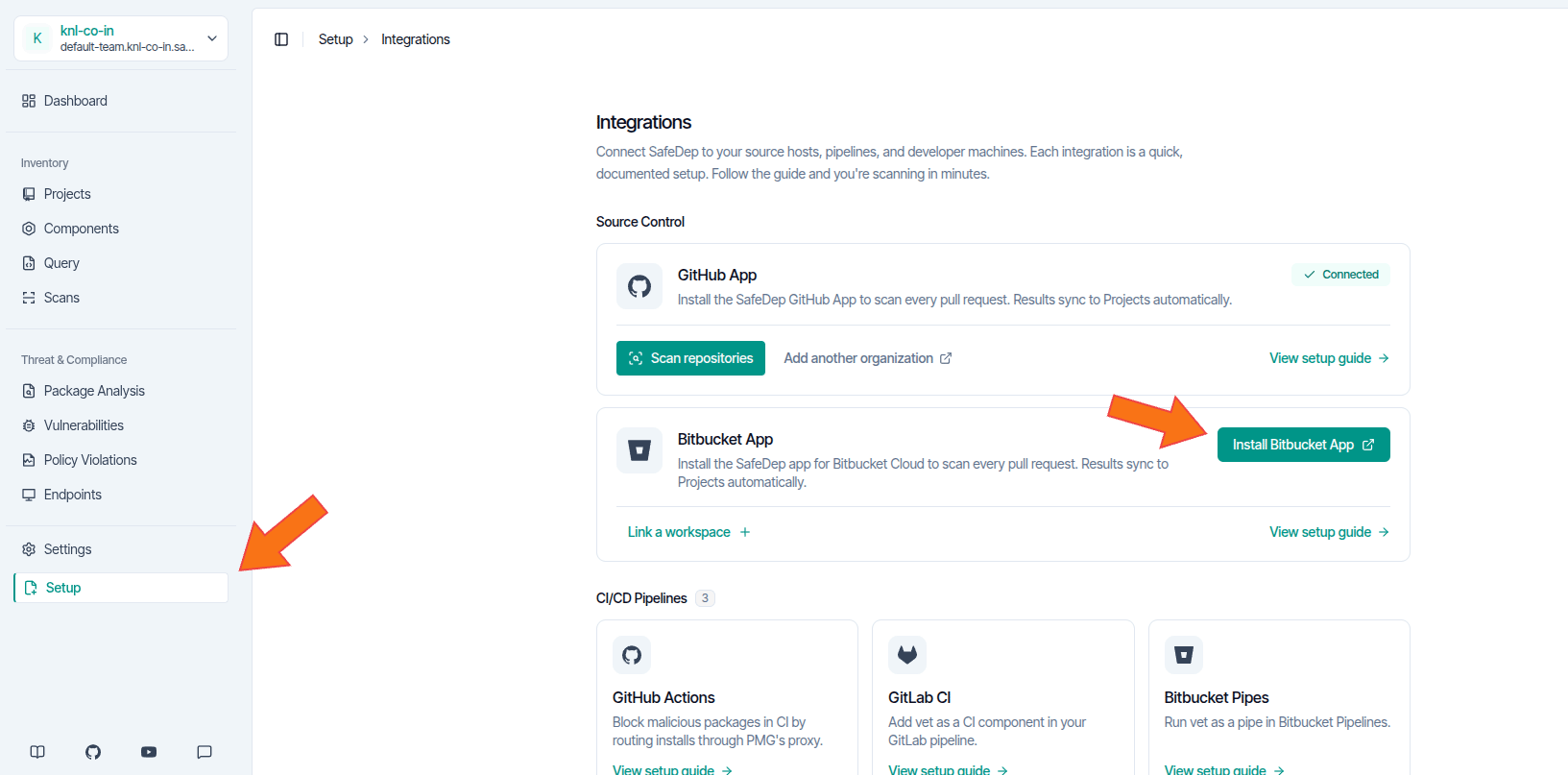
- Open the SafeDep app installation link.
- Select the workspace to install into and confirm.
Step 2: Link your workspace
Linking pairs the Bitbucket workspace with your SafeDep tenant. A short-lived, single-use link code proves that the same person controls both sides.- SafeDep console
- safedep CLI
Generate a link code:
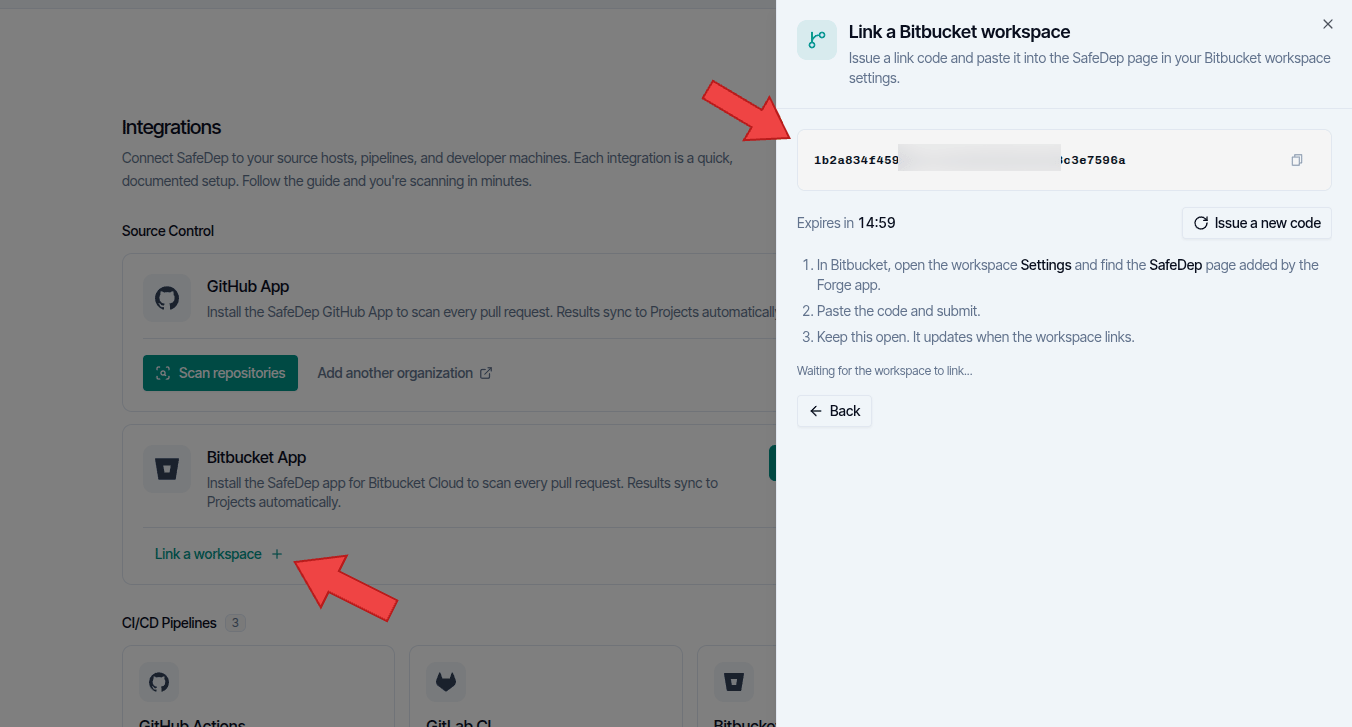
- Open Setup.
- On the Bitbucket App card, select Link a workspace.
-
Copy the code from the panel.
-
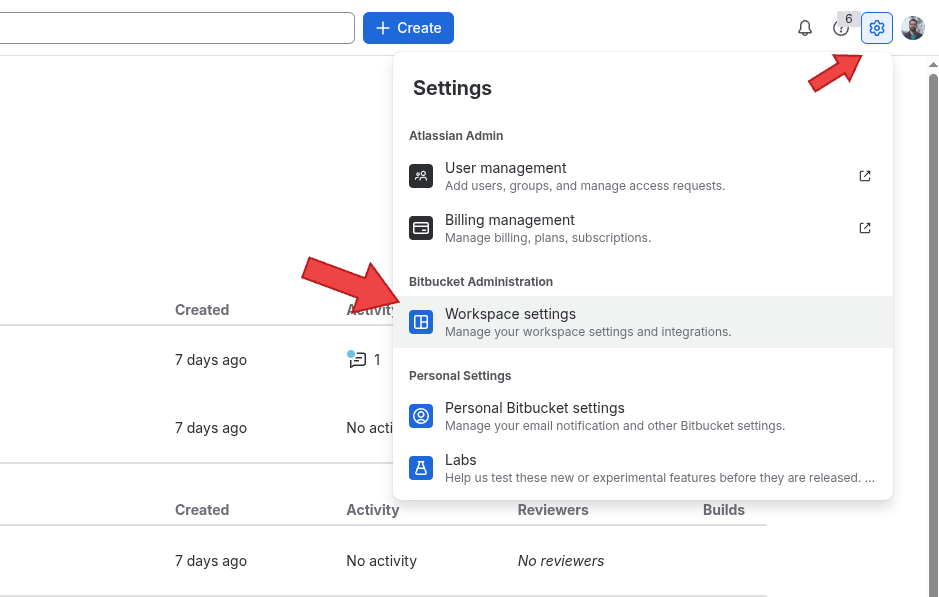
In Bitbucket, select the settings icon, then Workspace settings.
-
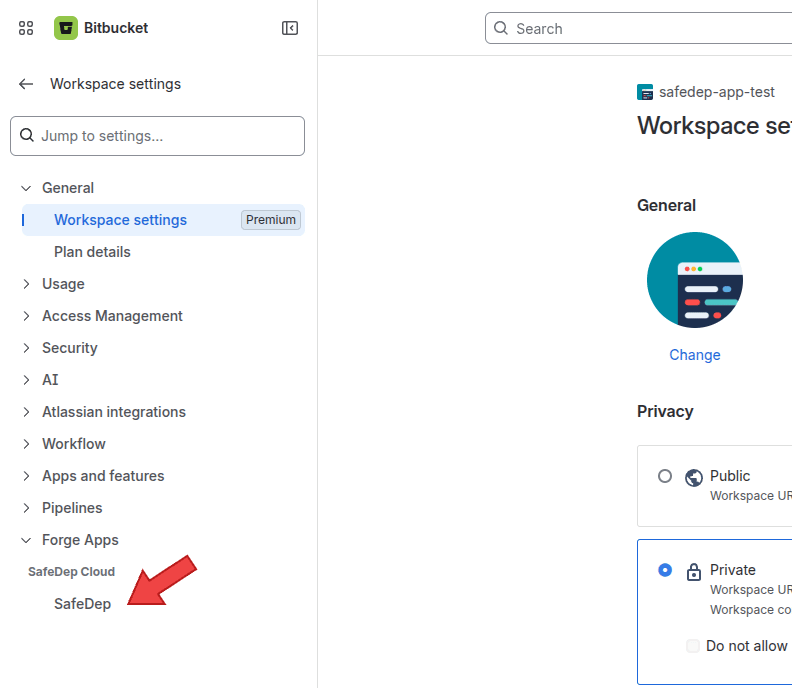
In the sidebar, under Forge Apps, select SafeDep.
-
Paste the code in Link code, then select Link workspace.
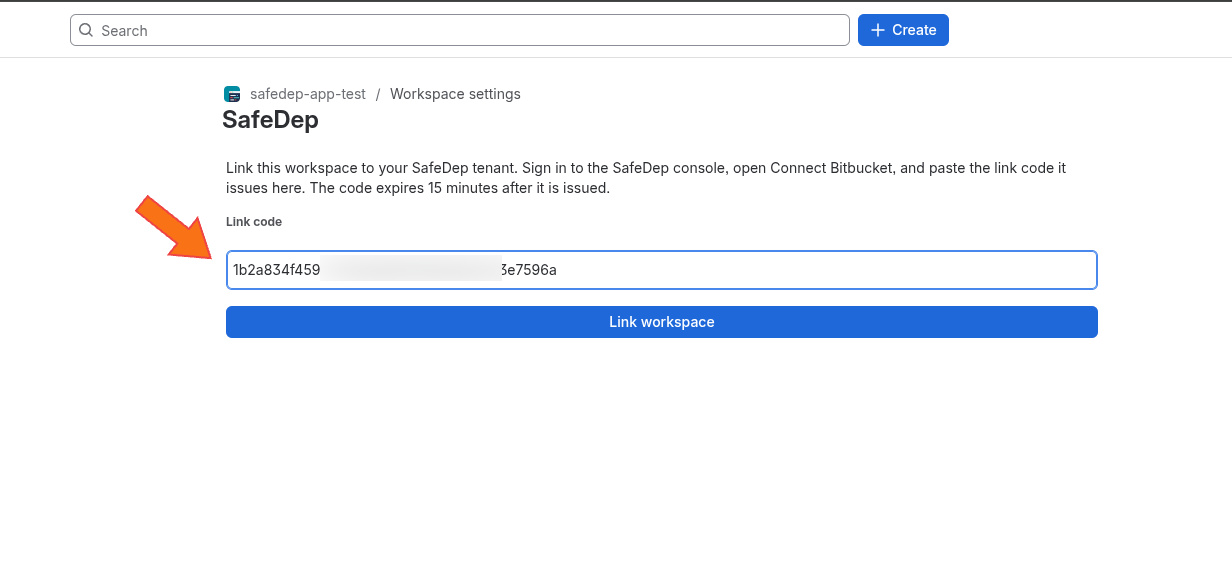
Step 3: Enable repositories for scanning
A fresh link scans nothing. The workspace has a scan scope,selected (the default) or all:
selected: only repositories on the allowlist are scanned.all: every repository in the workspace is scanned.
- SafeDep console
- safedep CLI
- Open Setup, then Integrations. The Bitbucket App card shows Connected.
-
Select Manage repositories.
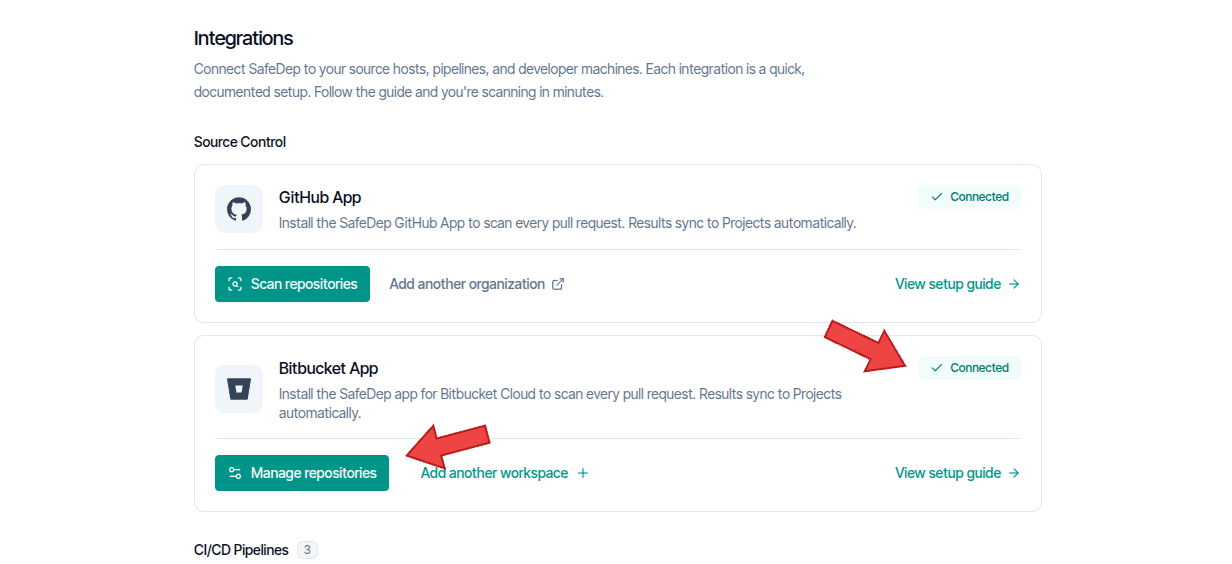
- Set Scan scope to All repositories or Selected.
-
For Selected, turn on the toggle for each repository to scan. Turn a toggle off to stop scanning that repository.
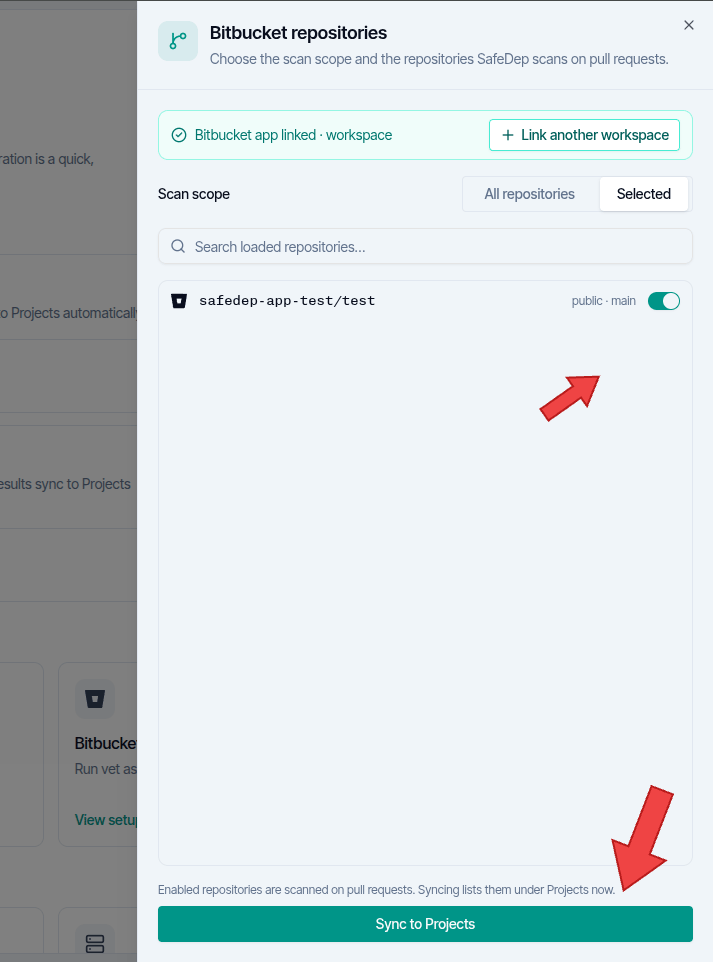
Step 4: Scan a pull request
Open or update a pull request on an enabled repository. The app scans changed dependencies and reports on:- Malicious / Suspicious packages
- Vulnerabilities
- Risky licenses
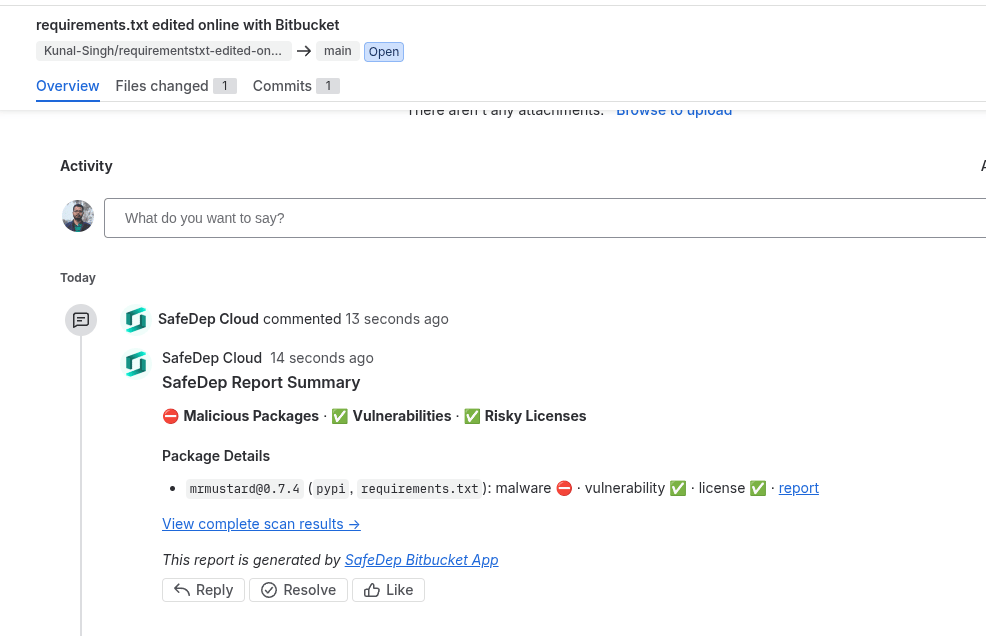
Set the gate with the cloud policy
The check reads the cloud policy of your tenant when the tenant has the Team or Enterprise plan. The policy decides the lowest vulnerability severity that fails the check, and its block and trust entries apply to the packages of the pull request. Verified malware always fails the check. With no cloud policy, the SafeDep default policy applies: the check fails on critical and high vulnerabilities. The GitHub App reads the same policy, so one policy covers both forges. To target Bitbucket projects only, select on thescm/forge=bitbucket label.
The check sets the build status of the commit. A failing check shows a policy block at the top of the pull request comment. The block names the policy revision and the rule or setting that failed each finding. See Fail Pull Request Checks.
Unlink or uninstall
Uninstall the SafeDep app from Workspace settings, under Installed apps, in Bitbucket. Uninstalling revokes the workspace link and deletes the workspace credential SafeDep holds. To connect again later, reinstall the app and link with a fresh code.Unlinking from the SafeDep side (CLI or console) without uninstalling the app is planned.
Troubleshooting
Limitations
- On-demand scans (
safedep project scan create) are not available for Bitbucket projects yet. Pull request scanning is the scan path today. - Merge checks (blocking a merge on a failing scan) are not available yet.
- The app authenticates to Bitbucket with a workspace-wide credential issued by Atlassian. Per-repository credentials are not part of the Forge model.